<?xml version="1.0" encoding="utf-8"?>
<feed xmlns="http://www.w3.org/2005/Atom">
    <id>https://docs.cloud.gov/news/</id>
    <title>Cloud.gov Docs Blog</title>
    <updated>2026-07-07T00:00:00.000Z</updated>
    <generator>https://github.com/jpmonette/feed</generator>
    <link rel="alternate" href="https://docs.cloud.gov/news/"/>
    <subtitle>Cloud.gov Docs Blog</subtitle>
    <icon>https://docs.cloud.gov/img/favicon.ico</icon>
    <entry>
        <title type="html"><![CDATA[Introducing Login.gov Authentication for Cloud.gov: Simpler, Faster, More Secure]]></title>
        <id>https://docs.cloud.gov/news/2026/07/07/login-gov-for-quicker-logins/</id>
        <link href="https://docs.cloud.gov/news/2026/07/07/login-gov-for-quicker-logins/"/>
        <updated>2026-07-07T00:00:00.000Z</updated>
        <summary type="html"><![CDATA[The Cloud.gov team is excited to announce that Login.gov is now available as an authentication option for Cloud.gov! This new integration brings the convenience and security of PIV/CAC authentication to our platform, making it easier than ever to access your Cloud.gov resources.]]></summary>
        <content type="html"><![CDATA[<p>The Cloud.gov team is excited to announce that Login.gov is now available as an authentication option for Cloud.gov! This new integration brings the convenience and security of PIV/CAC authentication to our platform, making it easier than ever to access your Cloud.gov resources.</p>
<h2 class="anchor anchorTargetStickyNavbar_Vzrq" id="whats-new">What's New?<a href="https://docs.cloud.gov/news/2026/07/07/login-gov-for-quicker-logins/#whats-new" class="hash-link" aria-label="Direct link to What's New?" title="Direct link to What's New?" translate="no">​</a></h2>
<p>Starting today, you can use your PIV/CAC card to authenticate through Login.gov when accessing Cloud.gov. Creating a Login.gov account is quick and easy, afterwards just your PIV/CAC card and you're ready to go.</p>
<h2 class="anchor anchorTargetStickyNavbar_Vzrq" id="key-benefits">Key Benefits<a href="https://docs.cloud.gov/news/2026/07/07/login-gov-for-quicker-logins/#key-benefits" class="hash-link" aria-label="Direct link to Key Benefits" title="Direct link to Key Benefits" translate="no">​</a></h2>
<h3 class="anchor anchorTargetStickyNavbar_Vzrq" id="enhanced-security">Enhanced Security<a href="https://docs.cloud.gov/news/2026/07/07/login-gov-for-quicker-logins/#enhanced-security" class="hash-link" aria-label="Direct link to Enhanced Security" title="Direct link to Enhanced Security" translate="no">​</a></h3>
<p>Login.gov authentication requires PIV/CAC, providing strong, phishing-resistant authentication that aligns with federal zero-trust security standards.</p>
<h3 class="anchor anchorTargetStickyNavbar_Vzrq" id="simplified-access">Simplified Access<a href="https://docs.cloud.gov/news/2026/07/07/login-gov-for-quicker-logins/#simplified-access" class="hash-link" aria-label="Direct link to Simplified Access" title="Direct link to Simplified Access" translate="no">​</a></h3>
<p>No need to remember another password or manage separate credentials. Your PIV/CAC is all you need.</p>
<h3 class="anchor anchorTargetStickyNavbar_Vzrq" id="automatic-migration">Automatic Migration<a href="https://docs.cloud.gov/news/2026/07/07/login-gov-for-quicker-logins/#automatic-migration" class="hash-link" aria-label="Direct link to Automatic Migration" title="Direct link to Automatic Migration" translate="no">​</a></h3>
<p>If you currently use Cloud.gov authentication, we'll automatically transfer your permissions when you first log in with Login.gov.</p>
<h2 class="anchor anchorTargetStickyNavbar_Vzrq" id="how-automatic-migration-works">How Automatic Migration Works<a href="https://docs.cloud.gov/news/2026/07/07/login-gov-for-quicker-logins/#how-automatic-migration-works" class="hash-link" aria-label="Direct link to How Automatic Migration Works" title="Direct link to How Automatic Migration Works" translate="no">​</a></h2>
<p>When you log in with Login.gov for the first time, our system will:</p>
<ol>
<li class=""><strong>Detect</strong> if you have an existing Cloud.gov account with the same email address</li>
<li class=""><strong>Copy</strong> all your organization roles, space roles, and organization memberships to your new Login.gov account</li>
<li class=""><strong>Remove</strong> your old Cloud.gov account to prevent confusion</li>
<li class=""><strong>Preserve</strong> all your access and permissions seamlessly</li>
</ol>
<p><strong>Example</strong>: If you currently use Cloud.gov authentication with <a href="mailto:john.doe@my-agency.gov" target="_blank" rel="noopener noreferrer" class="">john.doe@my-agency.gov</a> and log in with Login.gov using the same email address, all your roles will be automatically transferred.</p>
<p><strong>Important</strong>: After migration, you'll need to log out and log back in to see your copied roles and permissions.</p>
<h2 class="anchor anchorTargetStickyNavbar_Vzrq" id="who-is-impacted">Who Is Impacted?<a href="https://docs.cloud.gov/news/2026/07/07/login-gov-for-quicker-logins/#who-is-impacted" class="hash-link" aria-label="Direct link to Who Is Impacted?" title="Direct link to Who Is Impacted?" translate="no">​</a></h2>
<h3 class="anchor anchorTargetStickyNavbar_Vzrq" id="-action-required">✅ Action Required<a href="https://docs.cloud.gov/news/2026/07/07/login-gov-for-quicker-logins/#-action-required" class="hash-link" aria-label="Direct link to ✅ Action Required" title="Direct link to ✅ Action Required" translate="no">​</a></h3>
<p>Users who currently select <strong>"Cloud.gov"</strong> under the <strong>"Agency Credentials"</strong> section of the login page.</p>
<h3 class="anchor anchorTargetStickyNavbar_Vzrq" id="️-no-action-needed">✔️ No Action Needed<a href="https://docs.cloud.gov/news/2026/07/07/login-gov-for-quicker-logins/#%EF%B8%8F-no-action-needed" class="hash-link" aria-label="Direct link to ✔️ No Action Needed" title="Direct link to ✔️ No Action Needed" translate="no">​</a></h3>
<p>If you already use your agency login (such as GSA, EPA, or FDIC), this change doesn't affect you. Continue using your existing authentication method.</p>
<h2 class="anchor anchorTargetStickyNavbar_Vzrq" id="migration-eligibility">Migration Eligibility<a href="https://docs.cloud.gov/news/2026/07/07/login-gov-for-quicker-logins/#migration-eligibility" class="hash-link" aria-label="Direct link to Migration Eligibility" title="Direct link to Migration Eligibility" translate="no">​</a></h2>
<h3 class="anchor anchorTargetStickyNavbar_Vzrq" id="-automatic-migration-available">🟢 Automatic Migration Available<a href="https://docs.cloud.gov/news/2026/07/07/login-gov-for-quicker-logins/#-automatic-migration-available" class="hash-link" aria-label="Direct link to 🟢 Automatic Migration Available" title="Direct link to 🟢 Automatic Migration Available" translate="no">​</a></h3>
<ul>
<li class="">Your Cloud.gov account email matches your Login.gov email address</li>
</ul>
<h3 class="anchor anchorTargetStickyNavbar_Vzrq" id="-contact-support-for-manual-migration">🟡 Contact Support for Manual Migration<a href="https://docs.cloud.gov/news/2026/07/07/login-gov-for-quicker-logins/#-contact-support-for-manual-migration" class="hash-link" aria-label="Direct link to 🟡 Contact Support for Manual Migration" title="Direct link to 🟡 Contact Support for Manual Migration" translate="no">​</a></h3>
<ul>
<li class="">Email addresses don't match (including pif.gov and cio.gov accounts)</li>
</ul>
<h3 class="anchor anchorTargetStickyNavbar_Vzrq" id="-cannot-be-migrated">🔴 Cannot Be Migrated<a href="https://docs.cloud.gov/news/2026/07/07/login-gov-for-quicker-logins/#-cannot-be-migrated" class="hash-link" aria-label="Direct link to 🔴 Cannot Be Migrated" title="Direct link to 🔴 Cannot Be Migrated" translate="no">​</a></h3>
<ul>
<li class="">Users without PIV/CAC cards</li>
</ul>
<h2 class="anchor anchorTargetStickyNavbar_Vzrq" id="already-have-a-logingov-account">Already Have a Login.gov Account?<a href="https://docs.cloud.gov/news/2026/07/07/login-gov-for-quicker-logins/#already-have-a-logingov-account" class="hash-link" aria-label="Direct link to Already Have a Login.gov Account?" title="Direct link to Already Have a Login.gov Account?" translate="no">​</a></h2>
<p>Great! You're all set. When logging into Cloud.gov:</p>
<ul>
<li class="">PIV/CAC is the only MFA method allowed</li>
<li class="">You won't need your Login.gov username or password</li>
<li class="">Multiple email addresses are supported, to change which one is used review the <a href="https://www.login.gov/help/manage-your-account/change-partner-email-address/" target="_blank" rel="noopener noreferrer" class="">additional documentation on Login.gov</a></li>
<li class="">Just insert your PIV/CAC and authenticate</li>
</ul>
<p>Don't have a Login.gov account yet? No problem! One will be created automatically when you first authenticate with your PIV/CAC.</p>
<h2 class="anchor anchorTargetStickyNavbar_Vzrq" id="getting-started">Getting Started<a href="https://docs.cloud.gov/news/2026/07/07/login-gov-for-quicker-logins/#getting-started" class="hash-link" aria-label="Direct link to Getting Started" title="Direct link to Getting Started" translate="no">​</a></h2>
<p>Ready to try Login.gov authentication? It's simple:</p>
<ol>
<li class="">Navigate to <a href="https://login.fr.cloud.gov/" target="_blank" rel="noopener noreferrer" class="">https://login.fr.cloud.gov</a></li>
<li class="">Click <strong>"Sign in with Login.gov"</strong></li>
<li class="">Insert your PIV/CAC and follow the prompts</li>
<li class="">That's it!</li>
</ol>
<h2 class="anchor anchorTargetStickyNavbar_Vzrq" id="need-help">Need Help?<a href="https://docs.cloud.gov/news/2026/07/07/login-gov-for-quicker-logins/#need-help" class="hash-link" aria-label="Direct link to Need Help?" title="Direct link to Need Help?" translate="no">​</a></h2>
<p>If you have questions or need assistance with migration:</p>
<ul>
<li class="">Review our <a class="" href="https://docs.cloud.gov/news/2026/07/07/docs/platform/getting-started/login-migration.md/">Login.gov authentication documentation</a></li>
<li class="">Contact Cloud.gov support at <a href="mailto:support@cloud.gov" target="_blank" rel="noopener noreferrer" class="">support@cloud.gov</a></li>
<li class="">For manual migration requests, include both your Cloud.gov and PIV/CAC email addresses</li>
</ul>
<h2 class="anchor anchorTargetStickyNavbar_Vzrq" id="looking-ahead">Looking Ahead<a href="https://docs.cloud.gov/news/2026/07/07/login-gov-for-quicker-logins/#looking-ahead" class="hash-link" aria-label="Direct link to Looking Ahead" title="Direct link to Looking Ahead" translate="no">​</a></h2>
<p>This Login.gov integration is part of our ongoing commitment to improving security and user experience. In the future, we plan to deprecate the legacy Cloud.gov authentication option, but we'll provide plenty of notice and support throughout that transition.</p>
<p>On August 4th visual changes to the main login page will be made which will highlight the addition of Login.gov.</p>
<p>Start using Login.gov authentication today and experience the simplicity of PIV/CAC-based access to Cloud.gov!</p>
<hr>
<p><strong>Questions?</strong> Reach out to our support team or visit our documentation for more details about the Login.gov integration.</p>]]></content>
    </entry>
    <entry>
        <title type="html"><![CDATA[Container threat detection using Falco now enabled]]></title>
        <id>https://docs.cloud.gov/news/2026/05/20/falco-now-available/</id>
        <link href="https://docs.cloud.gov/news/2026/05/20/falco-now-available/"/>
        <updated>2026-05-20T00:00:00.000Z</updated>
        <summary type="html"><![CDATA[The Cloud.gov team is excited to announce the integration of Falco security monitoring into the platform, which will allow customers to monitor security events and anomalous behavior in their running containers through Cloud.gov Logs.]]></summary>
        <content type="html"><![CDATA[<p>The Cloud.gov team is excited to announce the integration of <a href="https://falco.org/docs" target="_blank" rel="noopener noreferrer" class="">Falco security monitoring</a> into the platform, which will allow customers to monitor security events and anomalous behavior in their running containers through <a href="https://logs.fr.cloud.gov/" target="_blank" rel="noopener noreferrer" class="">Cloud.gov Logs</a>.</p>
<h2 class="anchor anchorTargetStickyNavbar_Vzrq" id="what-is-falco">What is Falco?<a href="https://docs.cloud.gov/news/2026/05/20/falco-now-available/#what-is-falco" class="hash-link" aria-label="Direct link to What is Falco?" title="Direct link to What is Falco?" translate="no">​</a></h2>
<p>Falco is an open-source, cloud native security tool that detects real-time, anomalous behavior in running containers. Falco identifies potential security threats and abnormal activities. At its core, Falco is a monitoring and detection agent that observes events (such as Linux kernel events) and delivers real-time alerts based on custom rules. These custom rules are inherited from the Falco upstream, and maintained by the Cloud.gov Platform team. Falco helps Cloud.gov proactively defend systems, maintain compliance, and strengthen overall security posture. More details are available here: <a href="https://falco.org/" target="_blank" rel="noopener noreferrer" class="">https://falco.org/</a>.</p>
<h2 class="anchor anchorTargetStickyNavbar_Vzrq" id="falco-integration-in-cloudgov">Falco Integration in Cloud.gov<a href="https://docs.cloud.gov/news/2026/05/20/falco-now-available/#falco-integration-in-cloudgov" class="hash-link" aria-label="Direct link to Falco Integration in Cloud.gov" title="Direct link to Falco Integration in Cloud.gov" translate="no">​</a></h2>
<p>Falco is installed on all host VMs running your applications. It monitors and evaluates kernel events against an established rule set. Findings based on these rules are displayed in OpenSearch.</p>
<p>Because Falco is integrated at the platform level, <strong><em>you do not need to take any action or change your applications to enable Falco.</em></strong></p>
<h2 class="anchor anchorTargetStickyNavbar_Vzrq" id="what-types-of-events-does-falco-monitor">What Types of Events Does Falco Monitor?<a href="https://docs.cloud.gov/news/2026/05/20/falco-now-available/#what-types-of-events-does-falco-monitor" class="hash-link" aria-label="Direct link to What Types of Events Does Falco Monitor?" title="Direct link to What Types of Events Does Falco Monitor?" translate="no">​</a></h2>
<p>Falco contains an extensive default rule set that looks for events including but not limited to:</p>
<ul>
<li class="">Privilege escalation using privileged containers</li>
<li class="">Namespace changes using tools like setns</li>
<li class="">Read/Writes to well-known directories such as /etc, /usr/bin, /usr/sbin, etc</li>
</ul>
<p>For more details, see the Falco docs: <a href="https://falco.org/docs/#what-does-falco-check-for" target="_blank" rel="noopener noreferrer" class="">https://falco.org/docs/#what-does-falco-check-for</a>.</p>
<h2 class="anchor anchorTargetStickyNavbar_Vzrq" id="using-the-falco-dashboard">Using the Falco Dashboard<a href="https://docs.cloud.gov/news/2026/05/20/falco-now-available/#using-the-falco-dashboard" class="hash-link" aria-label="Direct link to Using the Falco Dashboard" title="Direct link to Using the Falco Dashboard" translate="no">​</a></h2>
<p>A quick way to view Falco security events is to:</p>
<ol>
<li class="">Log in to <a href="https://logs.fr.cloud.gov/" target="_blank" rel="noopener noreferrer" class="">Cloud.gov Logs</a></li>
<li class="">Click on "Dashboards" in the left sidebar menu</li>
<li class="">Enter "Services" in the search bar</li>
<li class="">Follow the link for <a href="https://logs.fr.cloud.gov/app/dashboards#/view/falco-dashboard" target="_blank" rel="noopener noreferrer" class="">"Falco Overview"</a></li>
</ol>
<h2 class="anchor anchorTargetStickyNavbar_Vzrq" id="how-to-search-falco-logs-in-cloudgov-logs">How to Search Falco Logs in Cloud.gov Logs<a href="https://docs.cloud.gov/news/2026/05/20/falco-now-available/#how-to-search-falco-logs-in-cloudgov-logs" class="hash-link" aria-label="Direct link to How to Search Falco Logs in Cloud.gov Logs" title="Direct link to How to Search Falco Logs in Cloud.gov Logs" translate="no">​</a></h2>
<p>Falco logs are ingested into the logging system with the value <code>@type: falco</code>, which provides an easy way to filter them.</p>
<p>To find your Falco security events in the logging system:</p>
<ol>
<li class="">Log in to <a href="https://logs.fr.cloud.gov/" target="_blank" rel="noopener noreferrer" class="">Cloud.gov Logs</a></li>
<li class="">Click on "Discover" in the left sidebar menu</li>
<li class="">Add a filter for <code>@type: falco</code> to your log search</li>
<li class="">Apply additional filters on the Falco event fields as desired. For example, to filter for specific rule types, add a filter of <code>falco_rule: [rule_name]</code></li>
</ol>
<h2 class="anchor anchorTargetStickyNavbar_Vzrq" id="falco-log-fields">Falco Log Fields<a href="https://docs.cloud.gov/news/2026/05/20/falco-now-available/#falco-log-fields" class="hash-link" aria-label="Direct link to Falco Log Fields" title="Direct link to Falco Log Fields" translate="no">​</a></h2>
<p>The fields available on Falco security event records are:</p>
<ul>
<li class=""><code>falco_priority</code> - Classification system to show the priority level of detected event(0 is Emergency,7 is debug)</li>
<li class=""><code>@message</code> - Contains the details of the Falco finding</li>
<li class=""><code>falco_rule</code> - Name of the Falco rule that generated the event (include this when contacting Cloud.gov Support)</li>
</ul>
<p>The complete list of Falco fields is available here: <a href="https://falco.org/docs/reference/rules/supported-fields/" target="_blank" rel="noopener noreferrer" class="">https://falco.org/docs/reference/rules/supported-fields/</a>.</p>
<h2 class="anchor anchorTargetStickyNavbar_Vzrq" id="retention">Retention<a href="https://docs.cloud.gov/news/2026/05/20/falco-now-available/#retention" class="hash-link" aria-label="Direct link to Retention" title="Direct link to Retention" translate="no">​</a></h2>
<p>Falco events are retained in the logging system for 1 year and in offline storage for 30 months.</p>]]></content>
    </entry>
    <entry>
        <title type="html"><![CDATA[Java buildpack upgrade notice]]></title>
        <id>https://docs.cloud.gov/news/2026/05/06/java-buildpack-major-version/</id>
        <link href="https://docs.cloud.gov/news/2026/05/06/java-buildpack-major-version/"/>
        <updated>2026-05-06T00:00:00.000Z</updated>
        <summary type="html"><![CDATA[What's Changing]]></summary>
        <content type="html"><![CDATA[<h2 class="anchor anchorTargetStickyNavbar_Vzrq" id="whats-changing">What's Changing<a href="https://docs.cloud.gov/news/2026/05/06/java-buildpack-major-version/#whats-changing" class="hash-link" aria-label="Direct link to What's Changing" title="Direct link to What's Changing" translate="no">​</a></h2>
<p>When you deploy Java applications on Cloud.gov, the <a href="https://docs.cloudfoundry.org/buildpacks/java/" target="_blank" rel="noopener noreferrer" class="">Java buildpack</a> provides your JVM and other dependencies. The Cloud Foundry Java buildpack team has completed a major rewrite, version 5, which removes legacy code and introduces <a href="https://github.com/cloudfoundry/java-buildpack/releases/tag/v5.0.0" target="_blank" rel="noopener noreferrer" class="">breaking changes</a> to how Java apps are built and deployed.</p>
<p><strong>Current status:</strong></p>
<ul>
<li class="">Default buildpack: v4.76.0 (March 2025)</li>
<li class="">New buildpack: v5.0.x series (in testing)</li>
<li class="">Timeline: v4.76.0 will remain the Cloud.gov default until v5.1.0 GA release, date not yet known</li>
</ul>
<h2 class="anchor anchorTargetStickyNavbar_Vzrq" id="why-you-should-act-now">Why You Should Act Now<a href="https://docs.cloud.gov/news/2026/05/06/java-buildpack-major-version/#why-you-should-act-now" class="hash-link" aria-label="Direct link to Why You Should Act Now" title="Direct link to Why You Should Act Now" translate="no">​</a></h2>
<p>The Cloud Foundry team is actively addressing issues in the new buildpack, but they can only fix bugs they know about. <strong>By testing your applications now, you'll help identify issues before the upgrade becomes the default</strong>, ensuring a smoother transition for your team and the entire Cloud.gov community.</p>
<h2 class="anchor anchorTargetStickyNavbar_Vzrq" id="step-1-review-the-relevant-documentation">Step 1: Review the relevant documentation<a href="https://docs.cloud.gov/news/2026/05/06/java-buildpack-major-version/#step-1-review-the-relevant-documentation" class="hash-link" aria-label="Direct link to Step 1: Review the relevant documentation" title="Direct link to Step 1: Review the relevant documentation" translate="no">​</a></h2>
<p>The following documents detail the changes, and provide additioanl context:</p>
<ul>
<li class=""><a href="https://github.com/cloudfoundry/java-buildpack/releases/tag/v5.0.0" target="_blank" rel="noopener noreferrer" class="">5.0.0 Release notes</a></li>
<li class=""><a href="https://github.com/cloudfoundry/community/blob/main/toc/rfc/rfc-0050-java-buildpack-migration-to-golang.md" target="_blank" rel="noopener noreferrer" class="">Cloud Foundry Community RFC</a></li>
</ul>
<h2 class="anchor anchorTargetStickyNavbar_Vzrq" id="step-2-test-your-java-applications">Step 2: Test Your Java Applications<a href="https://docs.cloud.gov/news/2026/05/06/java-buildpack-major-version/#step-2-test-your-java-applications" class="hash-link" aria-label="Direct link to Step 2: Test Your Java Applications" title="Direct link to Step 2: Test Your Java Applications" translate="no">​</a></h2>
<p>We strongly recommend that all Cloud.gov customers test their Java applications with the new buildpack. Early testing gives you time to address any compatibility issues before the migration, and may reveal bugs that need to be fixed upstream with Cloud Foundry.</p>
<h3 class="anchor anchorTargetStickyNavbar_Vzrq" id="option-a-test-using-the-cf-push-command">Option A: Test Using the <code>cf push</code> Command<a href="https://docs.cloud.gov/news/2026/05/06/java-buildpack-major-version/#option-a-test-using-the-cf-push-command" class="hash-link" aria-label="Direct link to option-a-test-using-the-cf-push-command" title="Direct link to option-a-test-using-the-cf-push-command" translate="no">​</a></h3>
<p>Run the following command to deploy your app with the 5.0.2 buildpack (update to 5.0.3, etc., as those become available)</p>
<div class="language-bash codeBlockContainer_Ckt0 theme-code-block" style="--prism-color:#393A34;--prism-background-color:#f6f8fa"><div class="codeBlockContent_QJqH"><pre tabindex="0" class="prism-code language-bash codeBlock_bY9V thin-scrollbar" style="color:#393A34;background-color:#f6f8fa"><code class="codeBlockLines_e6Vv"><div class="token-line" style="color:#393A34"><span class="token plain">cf push MY_APP --buildpack https://github.com/cloudfoundry/java-buildpack/releases/download/v5.0.2/java-buildpack-cflinuxfs4-v5.0.2.zip</span><br></div></code></pre></div></div>
<h3 class="anchor anchorTargetStickyNavbar_Vzrq" id="option-b-test-using-your-manifestyml-file">Option B: Test Using Your manifest.yml File<a href="https://docs.cloud.gov/news/2026/05/06/java-buildpack-major-version/#option-b-test-using-your-manifestyml-file" class="hash-link" aria-label="Direct link to Option B: Test Using Your manifest.yml File" title="Direct link to Option B: Test Using Your manifest.yml File" translate="no">​</a></h3>
<p>Add the 5.0.2 buildpack specification to your manifest file:</p>
<div class="language-yaml codeBlockContainer_Ckt0 theme-code-block" style="--prism-color:#393A34;--prism-background-color:#f6f8fa"><div class="codeBlockContent_QJqH"><pre tabindex="0" class="prism-code language-yaml codeBlock_bY9V thin-scrollbar" style="color:#393A34;background-color:#f6f8fa"><code class="codeBlockLines_e6Vv"><div class="token-line" style="color:#393A34"><span class="token plain">    </span><span class="token punctuation" style="color:#393A34">...</span><span class="token plain"></span><br></div><div class="token-line" style="color:#393A34"><span class="token plain">    </span><span class="token key atrule" style="color:#00a4db">buildpacks</span><span class="token punctuation" style="color:#393A34">:</span><span class="token plain"></span><br></div><div class="token-line" style="color:#393A34"><span class="token plain">      </span><span class="token punctuation" style="color:#393A34">-</span><span class="token plain"> https</span><span class="token punctuation" style="color:#393A34">:</span><span class="token plain">//github.com/cloudfoundry/java</span><span class="token punctuation" style="color:#393A34">-</span><span class="token plain">buildpack/releases/download/v5.0.2/java</span><span class="token punctuation" style="color:#393A34">-</span><span class="token plain">buildpack</span><span class="token punctuation" style="color:#393A34">-</span><span class="token plain">cflinuxfs4</span><span class="token punctuation" style="color:#393A34">-</span><span class="token plain">v5.0.2.zip</span><br></div><div class="token-line" style="color:#393A34"><span class="token plain">   </span><span class="token punctuation" style="color:#393A34">...</span><br></div></code></pre></div></div>
<p>Then deploy as usual with cf push.</p>
<p><strong>Pro tip: Test in a non-production environment first to validate behavior without undue risk.</strong></p>
<h2 class="anchor anchorTargetStickyNavbar_Vzrq" id="step-3-report-any-issues-you-encounter">Step 3: Report Any Issues You Encounter<a href="https://docs.cloud.gov/news/2026/05/06/java-buildpack-major-version/#step-3-report-any-issues-you-encounter" class="hash-link" aria-label="Direct link to Step 3: Report Any Issues You Encounter" title="Direct link to Step 3: Report Any Issues You Encounter" translate="no">​</a></h2>
<p>If you discover compatibility problems or unexpected behavior during testing:</p>
<ul>
<li class="">For buildpack-specific issues: Report them directly to the Cloud Foundry Java buildpack team at <a href="https://github.com/cloudfoundry/java-buildpack/issues" target="_blank" rel="noopener noreferrer" class="">https://github.com/cloudfoundry/java-buildpack/issues</a></li>
<li class="">Need help reporting an issue? Open a support request and our team will assist you in documenting and escalating the problem.</li>
</ul>
<p>When reporting issues, include:</p>
<ul>
<li class="">Your application's Java version</li>
<li class="">Relevant error messages or logs</li>
<li class="">Steps to reproduce the problem</li>
<li class="">Expected vs. actual behavior</li>
</ul>
<h3 class="anchor anchorTargetStickyNavbar_Vzrq" id="alternative-pin-your-buildpack-version-if-needed">Alternative: Pin Your Buildpack Version (If Needed)<a href="https://docs.cloud.gov/news/2026/05/06/java-buildpack-major-version/#alternative-pin-your-buildpack-version-if-needed" class="hash-link" aria-label="Direct link to Alternative: Pin Your Buildpack Version (If Needed)" title="Direct link to Alternative: Pin Your Buildpack Version (If Needed)" translate="no">​</a></h3>
<p>While we recommend adopting the v5.x buildpack as soon as it's generally available, you can temporarily pin your applications to an older version if you need more time to migrate. Use the same syntax shown above in the testing section to specify your preferred buildpack version.</p>
<p><strong>Note</strong>: Pinning to older versions means you won't receive the latest security updates and features, so plan to upgrade as soon as feasible.</p>
<p><strong>Timeline and Next Steps</strong>:</p>
<ol>
<li class="">Now through v5.1.0 GA release: Test your applications and report issues</li>
<li class="">When v5.1.0 is released: Cloud.gov will make v5.x the default buildpack</li>
<li class="">After the transition: Continue monitoring your applications and update any version pins</li>
</ol>
<p>Questions? Contact <a href="mailto:support@cloud.gov" target="_blank" rel="noopener noreferrer" class="">Cloud.gov support</a> for assistance.</p>]]></content>
    </entry>
    <entry>
        <title type="html"><![CDATA[New Network Metrics Now Available in Cloud.gov Logs]]></title>
        <id>https://docs.cloud.gov/news/2026/04/21/new-network-metrics/</id>
        <link href="https://docs.cloud.gov/news/2026/04/21/new-network-metrics/"/>
        <updated>2026-04-21T00:00:00.000Z</updated>
        <summary type="html"><![CDATA[We're excited to announce that Cloud.gov now provides application container network metrics, giving you deeper visibility into your application's network behavior. The new rxbytes (received bytes) and txbytes (transmitted bytes) metrics are now automatically collected and available in Cloud.gov Logs.]]></summary>
        <content type="html"><![CDATA[<p>We're excited to announce that Cloud.gov now provides application container network metrics, giving you deeper visibility into your application's network behavior. The new <code>rx_bytes</code> (received bytes) and <code>tx_bytes</code> (transmitted bytes) metrics are now automatically collected and available in Cloud.gov Logs.</p>
<h2 class="anchor anchorTargetStickyNavbar_Vzrq" id="whats-new">What's New?<a href="https://docs.cloud.gov/news/2026/04/21/new-network-metrics/#whats-new" class="hash-link" aria-label="Direct link to What's New?" title="Direct link to What's New?" translate="no">​</a></h2>
<p>Cloud.gov now captures two essential network metrics for all application containers:</p>
<ul>
<li class=""><strong>Received network traffic (<code>containermetric.rx_bytes</code>)</strong>: Total bytes received by your application container</li>
<li class=""><strong>Transmitted network traffic (<code>containermetric.tx_bytes</code>)</strong>: Total bytes sent by your application container</li>
</ul>
<p>These metrics are derived from Diego container telemetry and are automatically collected alongside existing CPU, memory, and disk metrics.</p>
<h2 class="anchor anchorTargetStickyNavbar_Vzrq" id="why-this-matters">Why This Matters<a href="https://docs.cloud.gov/news/2026/04/21/new-network-metrics/#why-this-matters" class="hash-link" aria-label="Direct link to Why This Matters" title="Direct link to Why This Matters" translate="no">​</a></h2>
<p>Network metrics provide crucial insights for:</p>
<ul>
<li class=""><strong>Performance monitoring</strong>: Track network throughput and identify potential bottlenecks</li>
<li class=""><strong>Troubleshooting</strong>: Correlate network activity with application behavior and performance issues</li>
<li class=""><strong>Capacity planning</strong>: Make informed decisions about scaling based on actual network usage patterns</li>
</ul>
<h2 class="anchor anchorTargetStickyNavbar_Vzrq" id="how-to-access-the-new-metrics">How to Access the New Metrics<a href="https://docs.cloud.gov/news/2026/04/21/new-network-metrics/#how-to-access-the-new-metrics" class="hash-link" aria-label="Direct link to How to Access the New Metrics" title="Direct link to How to Access the New Metrics" translate="no">​</a></h2>
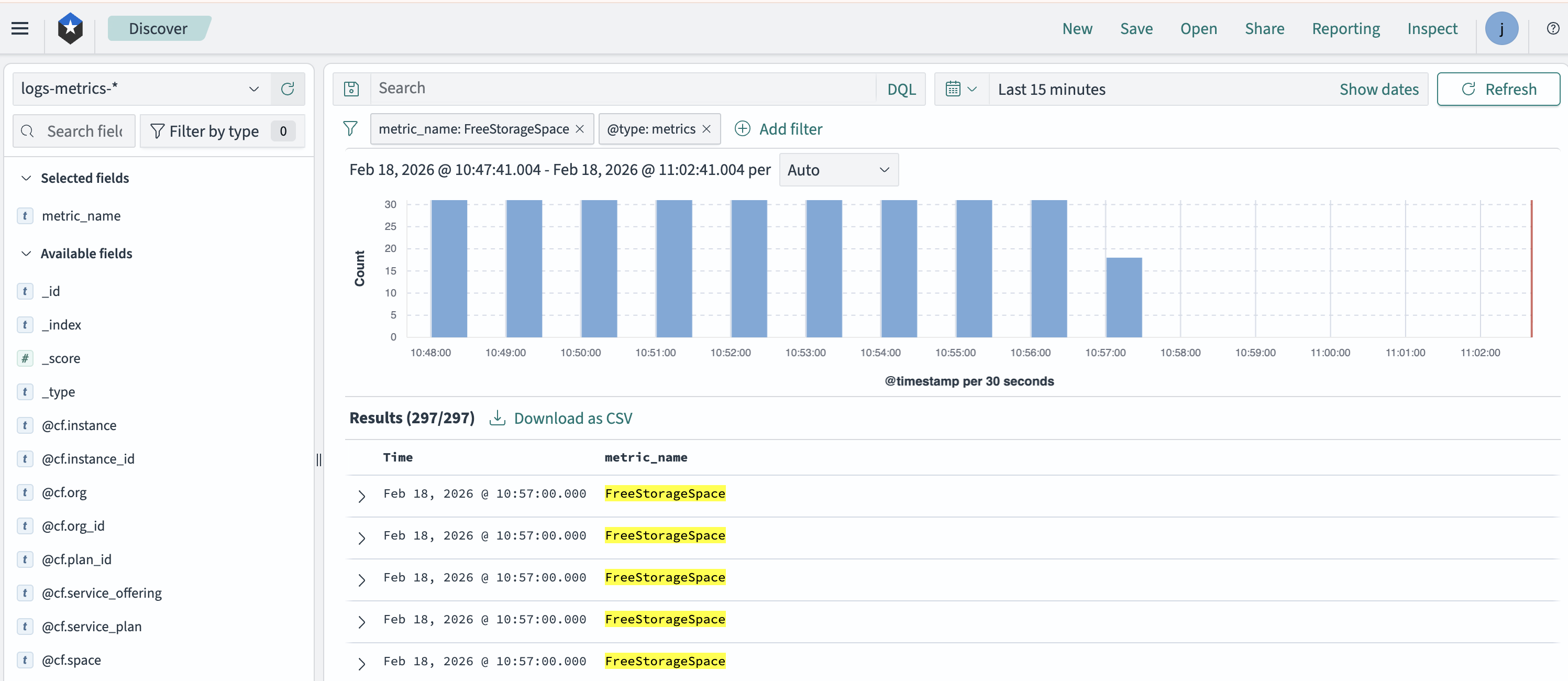
<p>The network metrics are available in the <code>logs-metrics-*</code> index pattern in Cloud.gov Logs. Here are some useful queries:</p>
<h3 class="anchor anchorTargetStickyNavbar_Vzrq" id="view-all-network-metrics-for-your-app">View all network metrics for your app:<a href="https://docs.cloud.gov/news/2026/04/21/new-network-metrics/#view-all-network-metrics-for-your-app" class="hash-link" aria-label="Direct link to View all network metrics for your app:" title="Direct link to View all network metrics for your app:" translate="no">​</a></h3>
<div class="language-text codeBlockContainer_Ckt0 theme-code-block" style="--prism-color:#393A34;--prism-background-color:#f6f8fa"><div class="codeBlockContent_QJqH"><pre tabindex="0" class="prism-code language-text codeBlock_bY9V thin-scrollbar" style="color:#393A34;background-color:#f6f8fa"><code class="codeBlockLines_e6Vv"><div class="token-line" style="color:#393A34"><span class="token plain">@type: app_metric AND (containermetric.name: rx_bytes OR containermetric.name: tx_bytes)</span><br></div></code></pre></div></div>
<h3 class="anchor anchorTargetStickyNavbar_Vzrq" id="filter-for-received-bytes-only">Filter for received bytes only:<a href="https://docs.cloud.gov/news/2026/04/21/new-network-metrics/#filter-for-received-bytes-only" class="hash-link" aria-label="Direct link to Filter for received bytes only:" title="Direct link to Filter for received bytes only:" translate="no">​</a></h3>
<div class="language-text codeBlockContainer_Ckt0 theme-code-block" style="--prism-color:#393A34;--prism-background-color:#f6f8fa"><div class="codeBlockContent_QJqH"><pre tabindex="0" class="prism-code language-text codeBlock_bY9V thin-scrollbar" style="color:#393A34;background-color:#f6f8fa"><code class="codeBlockLines_e6Vv"><div class="token-line" style="color:#393A34"><span class="token plain">@type: app_metric AND containermetric.name: rx_bytes</span><br></div></code></pre></div></div>
<h3 class="anchor anchorTargetStickyNavbar_Vzrq" id="filter-for-transmitted-bytes-only">Filter for transmitted bytes only:<a href="https://docs.cloud.gov/news/2026/04/21/new-network-metrics/#filter-for-transmitted-bytes-only" class="hash-link" aria-label="Direct link to Filter for transmitted bytes only:" title="Direct link to Filter for transmitted bytes only:" translate="no">​</a></h3>
<div class="language-text codeBlockContainer_Ckt0 theme-code-block" style="--prism-color:#393A34;--prism-background-color:#f6f8fa"><div class="codeBlockContent_QJqH"><pre tabindex="0" class="prism-code language-text codeBlock_bY9V thin-scrollbar" style="color:#393A34;background-color:#f6f8fa"><code class="codeBlockLines_e6Vv"><div class="token-line" style="color:#393A34"><span class="token plain">@type: app_metric AND containermetric.name: tx_bytes</span><br></div></code></pre></div></div>
<h3 class="anchor anchorTargetStickyNavbar_Vzrq" id="combine-with-other-filters">Combine with other filters:<a href="https://docs.cloud.gov/news/2026/04/21/new-network-metrics/#combine-with-other-filters" class="hash-link" aria-label="Direct link to Combine with other filters:" title="Direct link to Combine with other filters:" translate="no">​</a></h3>
<div class="language-text codeBlockContainer_Ckt0 theme-code-block" style="--prism-color:#393A34;--prism-background-color:#f6f8fa"><div class="codeBlockContent_QJqH"><pre tabindex="0" class="prism-code language-text codeBlock_bY9V thin-scrollbar" style="color:#393A34;background-color:#f6f8fa"><code class="codeBlockLines_e6Vv"><div class="token-line" style="color:#393A34"><span class="token plain">@type: app_metric AND containermetric.name: tx_bytes AND @cf.app: "your-app-name"</span><br></div></code></pre></div></div>
<h2 class="anchor anchorTargetStickyNavbar_Vzrq" id="what-you-can-do-with-this-data">What You Can Do With This Data<a href="https://docs.cloud.gov/news/2026/04/21/new-network-metrics/#what-you-can-do-with-this-data" class="hash-link" aria-label="Direct link to What You Can Do With This Data" title="Direct link to What You Can Do With This Data" translate="no">​</a></h2>
<ol>
<li class=""><strong>Create visualizations</strong>: Build dashboards showing network traffic patterns over time</li>
<li class=""><strong>Set up alerts</strong>: Monitor for unusual spikes in network activity</li>
<li class=""><strong>Analyze trends</strong>: Identify peak usage times and seasonal patterns</li>
<li class=""><strong>Correlate with other metrics</strong>: Compare network usage with CPU and memory to get a complete picture of application performance</li>
</ol>]]></content>
    </entry>
    <entry>
        <title type="html"><![CDATA[New versions and self-update support for Elasticache and RDS services]]></title>
        <id>https://docs.cloud.gov/news/2026/04/21/rds-elasticache-updates/</id>
        <link href="https://docs.cloud.gov/news/2026/04/21/rds-elasticache-updates/"/>
        <updated>2026-04-21T00:00:00.000Z</updated>
        <summary type="html"><![CDATA[New versions are available for Elasticache and RDS services on Cloud.gov. Cloud.gov customers can also now update the versions of their services themselves, rather than needing Cloud.gov support to make these changes for them.]]></summary>
        <content type="html"><![CDATA[<p>New versions are available for <a class="" href="https://docs.cloud.gov/platform/services/aws-elasticache/">Elasticache</a> and <a class="" href="https://docs.cloud.gov/platform/services/relational-database/">RDS</a> services on Cloud.gov. Cloud.gov customers can also now update the versions of their services themselves, rather than needing Cloud.gov support to make these changes for them.</p>
<h2 class="anchor anchorTargetStickyNavbar_Vzrq" id="new-versions-for-rds">New versions for RDS<a href="https://docs.cloud.gov/news/2026/04/21/rds-elasticache-updates/#new-versions-for-rds" class="hash-link" aria-label="Direct link to New versions for RDS" title="Direct link to New versions for RDS" translate="no">​</a></h2>
<p>Version 16 for PostgreSQL databases is now supported and <a class="" href="https://docs.cloud.gov/platform/services/relational-database/#plans">is now the default version for all PostgreSQL database plans</a>.</p>
<p>See the <a class="" href="https://docs.cloud.gov/platform/services/relational-database/">RDS service documentation</a> for more information.</p>
<h2 class="anchor anchorTargetStickyNavbar_Vzrq" id="update-rds-database-versions">Update RDS database versions<a href="https://docs.cloud.gov/news/2026/04/21/rds-elasticache-updates/#update-rds-database-versions" class="hash-link" aria-label="Direct link to Update RDS database versions" title="Direct link to Update RDS database versions" translate="no">​</a></h2>
<p>Updating the version of your RDS databases is now supported, whereas previously database version upgrades had to be performed by Cloud.gov support.</p>
<p>To update a MySQL database to version 8.4:</p>
<div class="language-shell codeBlockContainer_Ckt0 theme-code-block" style="--prism-color:#393A34;--prism-background-color:#f6f8fa"><div class="codeBlockContent_QJqH"><pre tabindex="0" class="prism-code language-shell codeBlock_bY9V thin-scrollbar" style="color:#393A34;background-color:#f6f8fa"><code class="codeBlockLines_e6Vv"><div class="token-line" style="color:#393A34"><span class="token plain">cf update-service ${SERVICE_NAME} \</span><br></div><div class="token-line" style="color:#393A34"><span class="token plain">    -c '{"version": "8.4", "allow_major_version_upgrade": true}'</span><br></div></code></pre></div></div>
<p>To update a PostgreSQL database to version 16:</p>
<div class="language-shell codeBlockContainer_Ckt0 theme-code-block" style="--prism-color:#393A34;--prism-background-color:#f6f8fa"><div class="codeBlockContent_QJqH"><pre tabindex="0" class="prism-code language-shell codeBlock_bY9V thin-scrollbar" style="color:#393A34;background-color:#f6f8fa"><code class="codeBlockLines_e6Vv"><div class="token-line" style="color:#393A34"><span class="token plain">cf update-service ${SERVICE_NAME} \</span><br></div><div class="token-line" style="color:#393A34"><span class="token plain">    -c '{"version": "16", "allow_major_version_upgrade": true}'</span><br></div></code></pre></div></div>
<p>See the <a class="" href="https://docs.cloud.gov/platform/services/relational-database/">RDS service documentation</a> for more information.</p>
<h2 class="anchor anchorTargetStickyNavbar_Vzrq" id="new-engines-and-versions-for-elasticache">New engines and versions for Elasticache<a href="https://docs.cloud.gov/news/2026/04/21/rds-elasticache-updates/#new-engines-and-versions-for-elasticache" class="hash-link" aria-label="Direct link to New engines and versions for Elasticache" title="Direct link to New engines and versions for Elasticache" translate="no">​</a></h2>
<p><a href="https://valkey.io/" target="_blank" rel="noopener noreferrer" class="">Valkey</a> has been added as a <a href="https://docs.aws.amazon.com/AmazonElastiCache/latest/dg/engine-versions.html" target="_blank" rel="noopener noreferrer" class="">supported engine for Elasticache services</a>. Valkey 8.2 can now be specified as the target engine and version when creating or updating Elasticache services.</p>
<p>To create an Elasticache service using Valkey 8.2:</p>
<div class="language-shell codeBlockContainer_Ckt0 theme-code-block" style="--prism-color:#393A34;--prism-background-color:#f6f8fa"><div class="codeBlockContent_QJqH"><pre tabindex="0" class="prism-code language-shell codeBlock_bY9V thin-scrollbar" style="color:#393A34;background-color:#f6f8fa"><code class="codeBlockLines_e6Vv"><div class="token-line" style="color:#393A34"><span class="token plain">cf create-service aws-elasticache-redis \</span><br></div><div class="token-line" style="color:#393A34"><span class="token plain">    ${SERVICE_PLAN_NAME} \</span><br></div><div class="token-line" style="color:#393A34"><span class="token plain">    ${SERVICE_NAME} \</span><br></div><div class="token-line" style="color:#393A34"><span class="token plain">    -c '{"engine": "valkey", "engineVersion": "8.2"}'</span><br></div></code></pre></div></div>
<p>See the <a class="" href="https://docs.cloud.gov/platform/services/aws-elasticache/">Elasticache service documentation</a> for more information.</p>
<h2 class="anchor anchorTargetStickyNavbar_Vzrq" id="update-elasticache-versions">Update Elasticache versions<a href="https://docs.cloud.gov/news/2026/04/21/rds-elasticache-updates/#update-elasticache-versions" class="hash-link" aria-label="Direct link to Update Elasticache versions" title="Direct link to Update Elasticache versions" translate="no">​</a></h2>
<p>Updating the version of your Elasticache service is now supported, whereas previously Elasticache version upgrades had to be performed by Cloud.gov support.</p>
<p>To update an Elasticache service to use Valkey 8.2:</p>
<div class="language-shell codeBlockContainer_Ckt0 theme-code-block" style="--prism-color:#393A34;--prism-background-color:#f6f8fa"><div class="codeBlockContent_QJqH"><pre tabindex="0" class="prism-code language-shell codeBlock_bY9V thin-scrollbar" style="color:#393A34;background-color:#f6f8fa"><code class="codeBlockLines_e6Vv"><div class="token-line" style="color:#393A34"><span class="token plain">cf update-service ${SERVICE_NAME} \</span><br></div><div class="token-line" style="color:#393A34"><span class="token plain">    -c '{"engine": "valkey", "engineVersion": "8.2"}'</span><br></div></code></pre></div></div>
<p>See the <a class="" href="https://docs.cloud.gov/platform/services/aws-elasticache/">Elasticache service documentation</a> for more information.</p>]]></content>
    </entry>
    <entry>
        <title type="html"><![CDATA[Now available in Cloud.gov Logs: Metrics for ElastiCache services]]></title>
        <id>https://docs.cloud.gov/news/2026/02/19/elasticache-metrics-now-available/</id>
        <link href="https://docs.cloud.gov/news/2026/02/19/elasticache-metrics-now-available/"/>
        <updated>2026-02-19T00:00:00.000Z</updated>
        <summary type="html"><![CDATA[The Cloud.gov team is excited to announce the addition of metrics and dashboards for brokered ElastiCache instances to Cloud.gov Logs, which will allow customers to monitor their ElasticCache services more effectively.]]></summary>
        <content type="html"><![CDATA[<p>The Cloud.gov team is excited to announce the addition of metrics and dashboards for brokered ElastiCache instances to <a href="https://logs.fr.cloud.gov/" target="_blank" rel="noopener noreferrer" class="">Cloud.gov Logs</a>, which will allow customers to monitor their ElasticCache services more effectively.</p>
<h2 class="anchor anchorTargetStickyNavbar_Vzrq" id="available-elasticache-metrics">Available ElastiCache Metrics<a href="https://docs.cloud.gov/news/2026/02/19/elasticache-metrics-now-available/#available-elasticache-metrics" class="hash-link" aria-label="Direct link to Available ElastiCache Metrics" title="Direct link to Available ElastiCache Metrics" translate="no">​</a></h2>
<h3 class="anchor anchorTargetStickyNavbar_Vzrq" id="memory-and-storage-metrics">Memory and Storage Metrics<a href="https://docs.cloud.gov/news/2026/02/19/elasticache-metrics-now-available/#memory-and-storage-metrics" class="hash-link" aria-label="Direct link to Memory and Storage Metrics" title="Direct link to Memory and Storage Metrics" translate="no">​</a></h3>
<h4 class="anchor anchorTargetStickyNavbar_Vzrq" id="cache-utilization">Cache Utilization<a href="https://docs.cloud.gov/news/2026/02/19/elasticache-metrics-now-available/#cache-utilization" class="hash-link" aria-label="Direct link to Cache Utilization" title="Direct link to Cache Utilization" translate="no">​</a></h4>
<p>These metrics help identify how efficiently the cache is being used.</p>
<ul>
<li class="">Bytes Used For Cache, metric_name: <code>BytesUsedForCache</code></li>
<li class="">Cache Hit Rate, metric_name: <code>CacheHitRate</code></li>
</ul>
<h4 class="anchor anchorTargetStickyNavbar_Vzrq" id="memory-capacity">Memory Capacity<a href="https://docs.cloud.gov/news/2026/02/19/elasticache-metrics-now-available/#memory-capacity" class="hash-link" aria-label="Direct link to Memory Capacity" title="Direct link to Memory Capacity" translate="no">​</a></h4>
<p>These metrics monitor memory consumption and potential memory-related issues.</p>
<ul>
<li class="">Database Memory Usage Percentage, metric_name: <code>DatabaseMemoryUsagePercentage</code></li>
<li class="">Database Capacity Usage Percentage, metric_name: <code>DatabaseCapacityUsagePercentage</code></li>
<li class="">Freeable Memory, metric_name: <code>FreeableMemory</code></li>
<li class="">Memory Fragmentation Ratio, metric_name: <code>MemoryFragmentationRatio</code></li>
</ul>
<h3 class="anchor anchorTargetStickyNavbar_Vzrq" id="system-resource-metrics">System Resource Metrics<a href="https://docs.cloud.gov/news/2026/02/19/elasticache-metrics-now-available/#system-resource-metrics" class="hash-link" aria-label="Direct link to System Resource Metrics" title="Direct link to System Resource Metrics" translate="no">​</a></h3>
<h4 class="anchor anchorTargetStickyNavbar_Vzrq" id="cpu-utilization">CPU Utilization<a href="https://docs.cloud.gov/news/2026/02/19/elasticache-metrics-now-available/#cpu-utilization" class="hash-link" aria-label="Direct link to CPU Utilization" title="Direct link to CPU Utilization" translate="no">​</a></h4>
<p>These metrics help identify processing load and potential performance bottlenecks.</p>
<ul>
<li class="">CPU Utilization, metric_name: <code>CPUUtilization</code></li>
<li class="">Engine CPU Utilization, metric_name: <code>EngineCPUUtilization</code></li>
</ul>
<h2 class="anchor anchorTargetStickyNavbar_Vzrq" id="using-the-services---elasticcache-dashboard">Using the Services - ElasticCache Dashboard<a href="https://docs.cloud.gov/news/2026/02/19/elasticache-metrics-now-available/#using-the-services---elasticcache-dashboard" class="hash-link" aria-label="Direct link to Using the Services - ElasticCache Dashboard" title="Direct link to Using the Services - ElasticCache Dashboard" translate="no">​</a></h2>
<p>A quick way to view ElasticCache metrics is to:</p>
<ol>
<li class="">Log in to the <a href="https://logs.fr.cloud.gov/" target="_blank" rel="noopener noreferrer" class="">logging system</a></li>
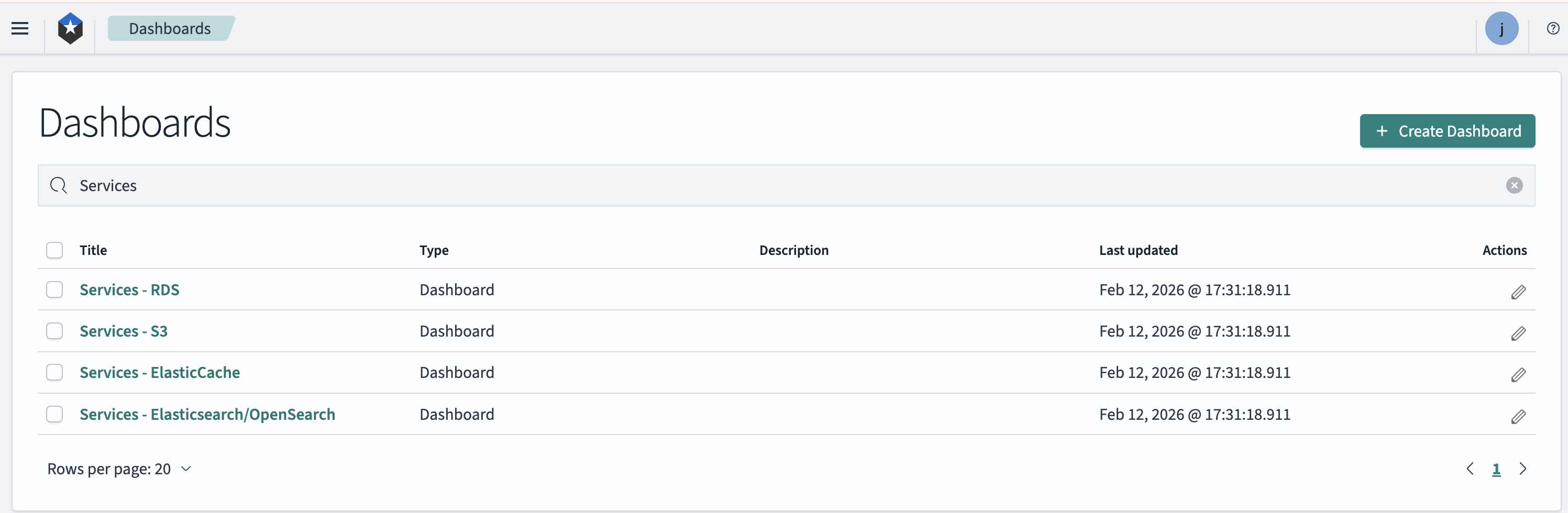
<li class="">Click on "Dashboards" in the left sidebar menu</li>
<li class="">Enter "Services" in the search bar</li>
<li class="">Follow the link for <a href="https://logs.fr.cloud.gov/app/dashboards#/view/services-elasticache-dashboard" target="_blank" rel="noopener noreferrer" class="">"Services - ElasticCache"</a></li>
</ol>
<p><img decoding="async" loading="lazy" alt="&amp;quot;Screenshot of searching OpenSearch Dashboards for ones with &amp;#39;Services&amp;#39; in the name&amp;quot;" src="https://docs.cloud.gov/assets/images/finding_service_dashboards-bc6109a9cfcd5a6537ab266de81462ff.png" width="2994" height="980" class="img_ev3q"></p>
<h2 class="anchor anchorTargetStickyNavbar_Vzrq" id="how-to-search-metrics-in-the-logging-system">How to Search Metrics in the Logging System<a href="https://docs.cloud.gov/news/2026/02/19/elasticache-metrics-now-available/#how-to-search-metrics-in-the-logging-system" class="hash-link" aria-label="Direct link to How to Search Metrics in the Logging System" title="Direct link to How to Search Metrics in the Logging System" translate="no">​</a></h2>
<p>Metrics are ingested into the logging system with the value <code>@type: metrics</code>, which provides an easy way to filter them.</p>
<p>To find your metrics in the logging system:</p>
<ol>
<li class="">Log in to the <a href="https://logs.fr.cloud.gov/" target="_blank" rel="noopener noreferrer" class="">logging system</a></li>
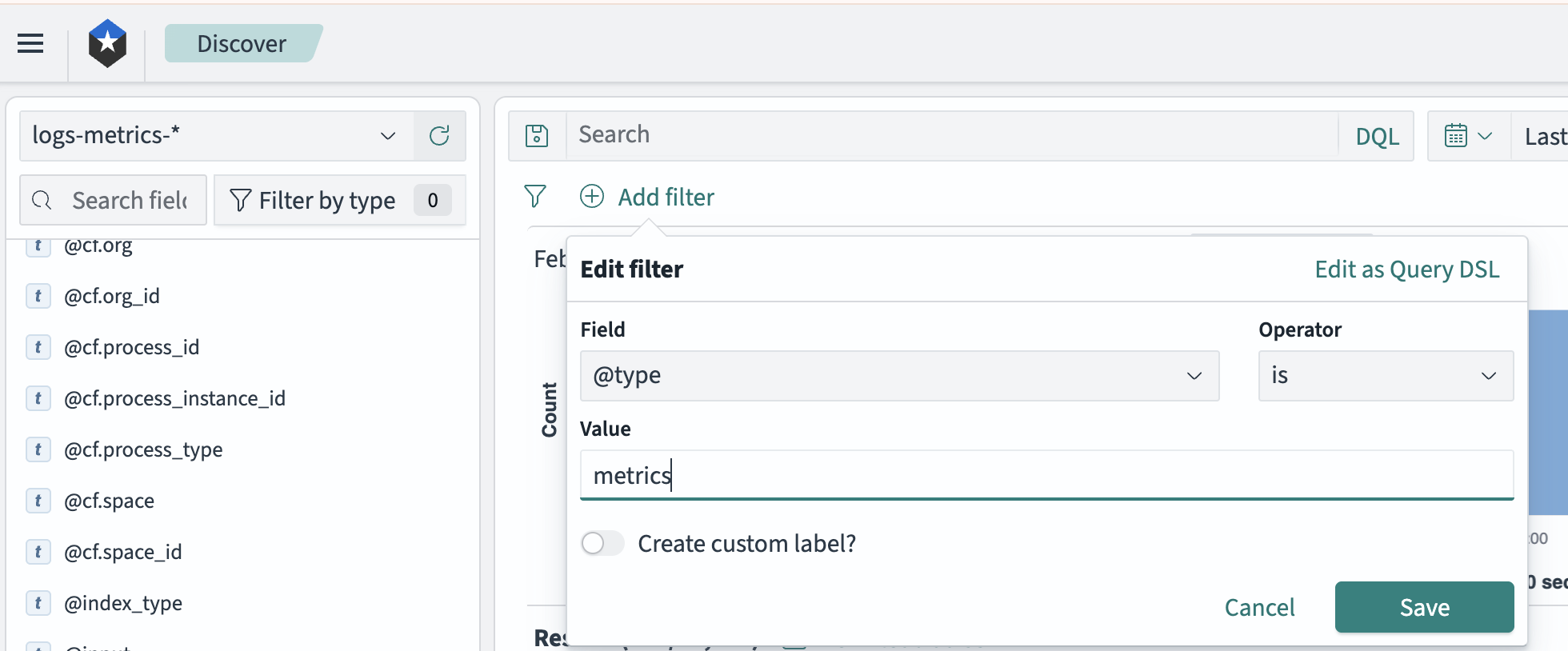
<li class="">Click on "Discover" in the left sidebar menu</li>
<li class="">Add a filter for <code>@type: metrics</code> to your log search</li>
</ol>
<p><img decoding="async" loading="lazy" alt="&amp;quot;Screenshot of OpenSearch Dashboards interface showing the addition of a filter for the @type field with a value of metrics&amp;quot;" src="https://docs.cloud.gov/assets/images/add-metrics-filter-9aea9c35ffc01dbfd929c44fdb6b3701.png" width="1960" height="814" class="img_ev3q"></p>
<ol start="4">
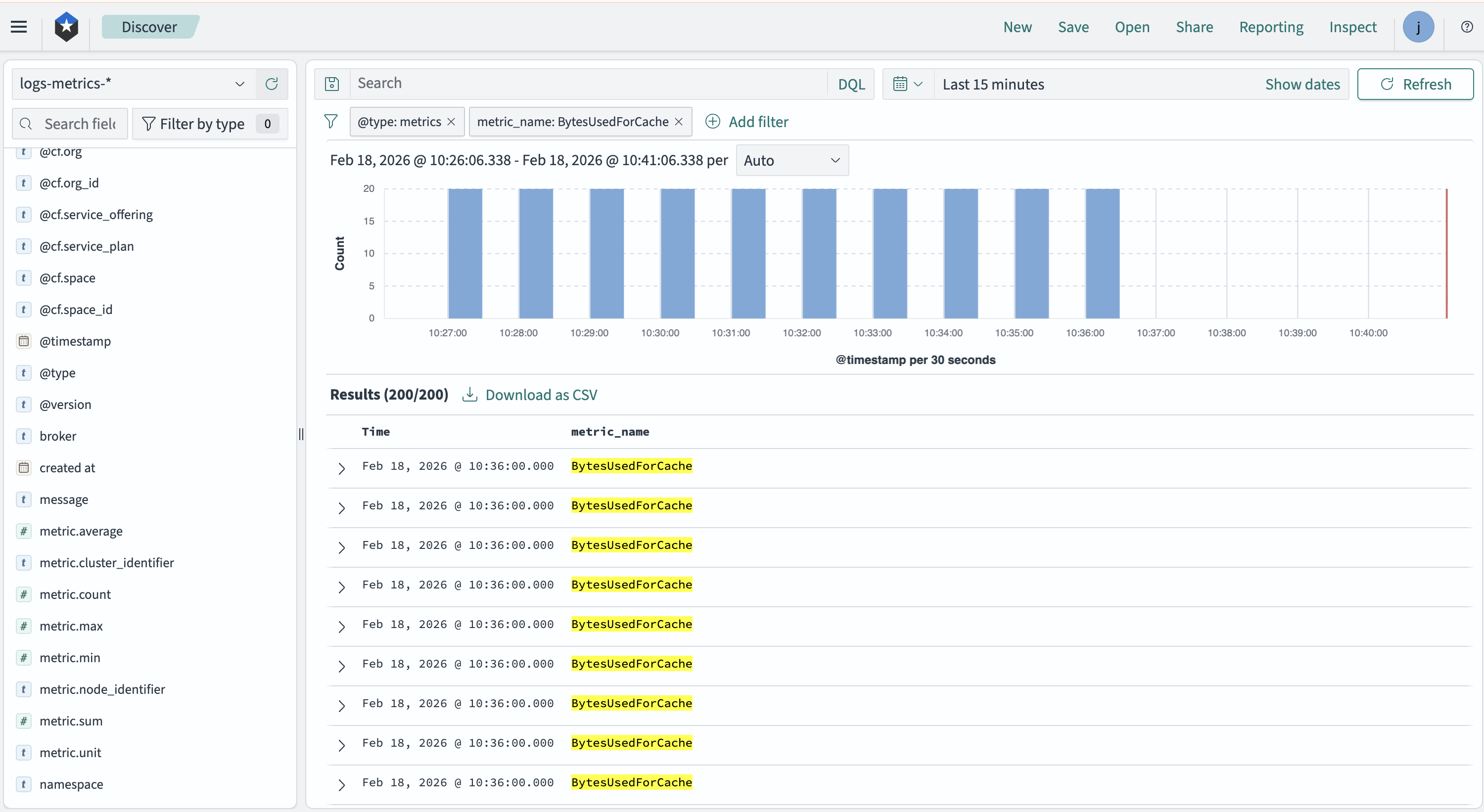
<li class="">Apply additional filters on the metrics event fields as desired. For example, to filter for BytesUsedForCache, add a filter of <code>metric_name: BytesUsedForCache</code>:</li>
</ol>
<p><img decoding="async" loading="lazy" alt="&amp;quot;Screenshot of OpenSearch Dashboards interface showing a filtered search for the metric BytesUsedForCache&amp;quot;" src="https://docs.cloud.gov/assets/images/filter-metric-elasticache-bytesusedforcache-e97b36ae2c40ccbbeb4abeaaeeaf262a.png" width="3000" height="1642" class="img_ev3q"></p>
<h2 class="anchor anchorTargetStickyNavbar_Vzrq" id="metrics-fields">Metrics Fields<a href="https://docs.cloud.gov/news/2026/02/19/elasticache-metrics-now-available/#metrics-fields" class="hash-link" aria-label="Direct link to Metrics Fields" title="Direct link to Metrics Fields" translate="no">​</a></h2>
<p>The fields available on elasticcache metrics records are:</p>
<ul>
<li class=""><code>@cf.service_offering</code> - Type of service being monitored</li>
<li class=""><code>@cf.service_plan</code> - Specific service plan details</li>
<li class=""><code>metric.average</code> - Numeric value of the metric</li>
<li class=""><code>metric_name</code> - Name of the specific metric</li>
<li class=""><code>metric.unit</code> - Unit of measurement</li>
<li class=""><code>metric.cluster_identifier</code> - ElastiCache cluster and node.</li>
</ul>
<h2 class="anchor anchorTargetStickyNavbar_Vzrq" id="retention">Retention<a href="https://docs.cloud.gov/news/2026/02/19/elasticache-metrics-now-available/#retention" class="hash-link" aria-label="Direct link to Retention" title="Direct link to Retention" translate="no">​</a></h2>
<p>Metric events are retained in the logging system for 3 months and in offline storage for 30 months.</p>]]></content>
    </entry>
    <entry>
        <title type="html"><![CDATA[Now available: Alerting for Cloud.gov logs]]></title>
        <id>https://docs.cloud.gov/news/2026/02/10/log-alerting-now-available/</id>
        <link href="https://docs.cloud.gov/news/2026/02/10/log-alerting-now-available/"/>
        <updated>2026-02-10T00:00:00.000Z</updated>
        <summary type="html"><![CDATA[Alerting is now available for Cloud.gov Logs. This new feature allows users to monitor their logs and receive email alerts when certain conditions or thresholds are met.]]></summary>
        <content type="html"><![CDATA[<p>Alerting is now available for <a href="https://logs.fr.cloud.gov/" target="_blank" rel="noopener noreferrer" class="">Cloud.gov Logs</a>. This new feature allows users to monitor their logs and receive email alerts when certain conditions or thresholds are met.</p>
<h2 class="anchor anchorTargetStickyNavbar_Vzrq" id="how-you-can-use-alerts">How you can use alerts<a href="https://docs.cloud.gov/news/2026/02/10/log-alerting-now-available/#how-you-can-use-alerts" class="hash-link" aria-label="Direct link to How you can use alerts" title="Direct link to How you can use alerts" translate="no">​</a></h2>
<p>You can use the alerting feature of Cloud.gov Logs to be alerted based on:</p>
<ul>
<li class="">The count of documents returned by a query for the given time period</li>
<li class="">The average, sum, maximum, or minimum value of a field value for the given time period</li>
</ul>
<p>For example, you can receive alerts when:</p>
<ul>
<li class="">There are elevated 404 response rates for your application</li>
<li class="">Specific terms or phrases (e.g. errors, exceptions) appear in your logs</li>
<li class="">Your database storage has reached a certain percentage</li>
</ul>
<h2 class="anchor anchorTargetStickyNavbar_Vzrq" id="documentation">Documentation<a href="https://docs.cloud.gov/news/2026/02/10/log-alerting-now-available/#documentation" class="hash-link" aria-label="Direct link to Documentation" title="Direct link to Documentation" translate="no">​</a></h2>
<p>For information on how to configure log-based alerts, please visit the <a class="" href="https://docs.cloud.gov/platform/logs/alerting/">Alerting page in the Observability section of this website</a>.</p>
<h2 class="anchor anchorTargetStickyNavbar_Vzrq" id="example-1-alerting-on-high-disk-usage-for-an-rds-database">Example 1: Alerting on high disk usage for an RDS database<a href="https://docs.cloud.gov/news/2026/02/10/log-alerting-now-available/#example-1-alerting-on-high-disk-usage-for-an-rds-database" class="hash-link" aria-label="Direct link to Example 1: Alerting on high disk usage for an RDS database" title="Direct link to Example 1: Alerting on high disk usage for an RDS database" translate="no">​</a></h2>
<p>To receive alerts when the percentage of storage used by an RDS database service exceeds a certain threshold (e.g. 85%):</p>
<ol>
<li class="">
<p><a class="" href="https://docs.cloud.gov/platform/logs/alerting/#setting-up-notifications">Set up the notifications to configure what emails will receive alerts</a></p>
</li>
<li class="">
<p>Open the OpenSearch navigation menu, then select <strong>Alerting</strong> under <strong>OpenSearch Plugins</strong></p>
</li>
<li class="">
<p>Click the <strong>Monitors</strong> link in the tabbed navigation near the top of the page</p>
</li>
<li class="">
<p>Click the <strong>Create monitor</strong> button near the top right of the page</p>
</li>
<li class="">
<p>On the <strong>Create monitor</strong> page, enter the following information in the <strong>Monitor details</strong> section:</p>
<ul>
<li class=""><strong>Monitor name</strong>: Any descriptive name for this monitor (e.g. "MonitorHighRDSDiskUsage")</li>
<li class=""><strong>Monitor type</strong>: Per query monitor</li>
<li class=""><strong>Monitor defining method</strong>: Extraction query editor</li>
<li class=""><strong>Schedule</strong>: 1 hour</li>
</ul>
</li>
<li class="">
<p>In the <strong>Select data</strong> section, enter the following details:</p>
<ul>
<li class=""><strong>Indexes</strong>: <code>logs-metrics*</code></li>
<li class=""><strong>Time Field</strong>: <code>@timestamp</code></li>
</ul>
</li>
<li class="">
<p>In the <strong>Query</strong> section, enter this query in the <strong>Define extraction query</strong> box, replacing <code>&lt;your-instance-name&gt;</code> with the name of the database service whose disk usage you want to monitor:</p>
<div class="language-json codeBlockContainer_Ckt0 theme-code-block" style="--prism-color:#393A34;--prism-background-color:#f6f8fa"><div class="codeBlockContent_QJqH"><pre tabindex="0" class="prism-code language-json codeBlock_bY9V thin-scrollbar" style="color:#393A34;background-color:#f6f8fa"><code class="codeBlockLines_e6Vv"><div class="token-line" style="color:#393A34"><span class="token punctuation" style="color:#393A34">{</span><span class="token plain"></span><br></div><div class="token-line" style="color:#393A34"><span class="token plain">  </span><span class="token property" style="color:#36acaa">"size"</span><span class="token operator" style="color:#393A34">:</span><span class="token plain"> </span><span class="token number" style="color:#36acaa">1</span><span class="token punctuation" style="color:#393A34">,</span><span class="token plain"></span><br></div><div class="token-line" style="color:#393A34"><span class="token plain">  </span><span class="token property" style="color:#36acaa">"query"</span><span class="token operator" style="color:#393A34">:</span><span class="token plain"> </span><span class="token punctuation" style="color:#393A34">{</span><span class="token plain"></span><br></div><div class="token-line" style="color:#393A34"><span class="token plain">    </span><span class="token property" style="color:#36acaa">"bool"</span><span class="token operator" style="color:#393A34">:</span><span class="token plain"> </span><span class="token punctuation" style="color:#393A34">{</span><span class="token plain"></span><br></div><div class="token-line" style="color:#393A34"><span class="token plain">      </span><span class="token property" style="color:#36acaa">"filter"</span><span class="token operator" style="color:#393A34">:</span><span class="token plain"> </span><span class="token punctuation" style="color:#393A34">[</span><span class="token plain"></span><br></div><div class="token-line" style="color:#393A34"><span class="token plain">        </span><span class="token punctuation" style="color:#393A34">{</span><span class="token plain"></span><br></div><div class="token-line" style="color:#393A34"><span class="token plain">          </span><span class="token property" style="color:#36acaa">"match_phrase"</span><span class="token operator" style="color:#393A34">:</span><span class="token plain"> </span><span class="token punctuation" style="color:#393A34">{</span><span class="token plain"></span><br></div><div class="token-line" style="color:#393A34"><span class="token plain">            </span><span class="token property" style="color:#36acaa">"@cf.service_offering"</span><span class="token operator" style="color:#393A34">:</span><span class="token plain"> </span><span class="token punctuation" style="color:#393A34">{</span><span class="token plain"></span><br></div><div class="token-line" style="color:#393A34"><span class="token plain">              </span><span class="token property" style="color:#36acaa">"query"</span><span class="token operator" style="color:#393A34">:</span><span class="token plain"> </span><span class="token string" style="color:#e3116c">"aws-rds"</span><span class="token punctuation" style="color:#393A34">,</span><span class="token plain"></span><br></div><div class="token-line" style="color:#393A34"><span class="token plain">              </span><span class="token property" style="color:#36acaa">"slop"</span><span class="token operator" style="color:#393A34">:</span><span class="token plain"> </span><span class="token number" style="color:#36acaa">0</span><span class="token punctuation" style="color:#393A34">,</span><span class="token plain"></span><br></div><div class="token-line" style="color:#393A34"><span class="token plain">              </span><span class="token property" style="color:#36acaa">"zero_terms_query"</span><span class="token operator" style="color:#393A34">:</span><span class="token plain"> </span><span class="token string" style="color:#e3116c">"NONE"</span><span class="token punctuation" style="color:#393A34">,</span><span class="token plain"></span><br></div><div class="token-line" style="color:#393A34"><span class="token plain">              </span><span class="token property" style="color:#36acaa">"boost"</span><span class="token operator" style="color:#393A34">:</span><span class="token plain"> </span><span class="token number" style="color:#36acaa">1</span><span class="token plain"></span><br></div><div class="token-line" style="color:#393A34"><span class="token plain">            </span><span class="token punctuation" style="color:#393A34">}</span><span class="token plain"></span><br></div><div class="token-line" style="color:#393A34"><span class="token plain">          </span><span class="token punctuation" style="color:#393A34">}</span><span class="token plain"></span><br></div><div class="token-line" style="color:#393A34"><span class="token plain">        </span><span class="token punctuation" style="color:#393A34">}</span><span class="token punctuation" style="color:#393A34">,</span><span class="token plain"></span><br></div><div class="token-line" style="color:#393A34"><span class="token plain">        </span><span class="token punctuation" style="color:#393A34">{</span><span class="token plain"></span><br></div><div class="token-line" style="color:#393A34"><span class="token plain">          </span><span class="token property" style="color:#36acaa">"match_phrase"</span><span class="token operator" style="color:#393A34">:</span><span class="token plain"> </span><span class="token punctuation" style="color:#393A34">{</span><span class="token plain"></span><br></div><div class="token-line" style="color:#393A34"><span class="token plain">            </span><span class="token property" style="color:#36acaa">"metric_name"</span><span class="token operator" style="color:#393A34">:</span><span class="token plain"> </span><span class="token punctuation" style="color:#393A34">{</span><span class="token plain"></span><br></div><div class="token-line" style="color:#393A34"><span class="token plain">              </span><span class="token property" style="color:#36acaa">"query"</span><span class="token operator" style="color:#393A34">:</span><span class="token plain"> </span><span class="token string" style="color:#e3116c">"FreeStorageSpace"</span><span class="token punctuation" style="color:#393A34">,</span><span class="token plain"></span><br></div><div class="token-line" style="color:#393A34"><span class="token plain">              </span><span class="token property" style="color:#36acaa">"slop"</span><span class="token operator" style="color:#393A34">:</span><span class="token plain"> </span><span class="token number" style="color:#36acaa">0</span><span class="token punctuation" style="color:#393A34">,</span><span class="token plain"></span><br></div><div class="token-line" style="color:#393A34"><span class="token plain">              </span><span class="token property" style="color:#36acaa">"zero_terms_query"</span><span class="token operator" style="color:#393A34">:</span><span class="token plain"> </span><span class="token string" style="color:#e3116c">"NONE"</span><span class="token punctuation" style="color:#393A34">,</span><span class="token plain"></span><br></div><div class="token-line" style="color:#393A34"><span class="token plain">              </span><span class="token property" style="color:#36acaa">"boost"</span><span class="token operator" style="color:#393A34">:</span><span class="token plain"> </span><span class="token number" style="color:#36acaa">1</span><span class="token plain"></span><br></div><div class="token-line" style="color:#393A34"><span class="token plain">            </span><span class="token punctuation" style="color:#393A34">}</span><span class="token plain"></span><br></div><div class="token-line" style="color:#393A34"><span class="token plain">          </span><span class="token punctuation" style="color:#393A34">}</span><span class="token plain"></span><br></div><div class="token-line" style="color:#393A34"><span class="token plain">        </span><span class="token punctuation" style="color:#393A34">}</span><span class="token punctuation" style="color:#393A34">,</span><span class="token plain"></span><br></div><div class="token-line" style="color:#393A34"><span class="token plain">        </span><span class="token punctuation" style="color:#393A34">{</span><span class="token plain"></span><br></div><div class="token-line" style="color:#393A34"><span class="token plain">          </span><span class="token property" style="color:#36acaa">"match_phrase"</span><span class="token operator" style="color:#393A34">:</span><span class="token plain"> </span><span class="token punctuation" style="color:#393A34">{</span><span class="token plain"></span><br></div><div class="token-line" style="color:#393A34"><span class="token plain">            </span><span class="token property" style="color:#36acaa">"@cf.instance"</span><span class="token operator" style="color:#393A34">:</span><span class="token plain"> </span><span class="token punctuation" style="color:#393A34">{</span><span class="token plain"></span><br></div><div class="token-line" style="color:#393A34"><span class="token plain">              </span><span class="token property" style="color:#36acaa">"query"</span><span class="token operator" style="color:#393A34">:</span><span class="token plain"> </span><span class="token string" style="color:#e3116c">"&lt;your-instance-name&gt;"</span><span class="token punctuation" style="color:#393A34">,</span><span class="token plain"></span><br></div><div class="token-line" style="color:#393A34"><span class="token plain">              </span><span class="token property" style="color:#36acaa">"slop"</span><span class="token operator" style="color:#393A34">:</span><span class="token plain"> </span><span class="token number" style="color:#36acaa">0</span><span class="token punctuation" style="color:#393A34">,</span><span class="token plain"></span><br></div><div class="token-line" style="color:#393A34"><span class="token plain">              </span><span class="token property" style="color:#36acaa">"zero_terms_query"</span><span class="token operator" style="color:#393A34">:</span><span class="token plain"> </span><span class="token string" style="color:#e3116c">"NONE"</span><span class="token punctuation" style="color:#393A34">,</span><span class="token plain"></span><br></div><div class="token-line" style="color:#393A34"><span class="token plain">              </span><span class="token property" style="color:#36acaa">"boost"</span><span class="token operator" style="color:#393A34">:</span><span class="token plain"> </span><span class="token number" style="color:#36acaa">1</span><span class="token plain"></span><br></div><div class="token-line" style="color:#393A34"><span class="token plain">            </span><span class="token punctuation" style="color:#393A34">}</span><span class="token plain"></span><br></div><div class="token-line" style="color:#393A34"><span class="token plain">          </span><span class="token punctuation" style="color:#393A34">}</span><span class="token plain"></span><br></div><div class="token-line" style="color:#393A34"><span class="token plain">        </span><span class="token punctuation" style="color:#393A34">}</span><span class="token punctuation" style="color:#393A34">,</span><span class="token plain"></span><br></div><div class="token-line" style="color:#393A34"><span class="token plain">        </span><span class="token punctuation" style="color:#393A34">{</span><span class="token plain"></span><br></div><div class="token-line" style="color:#393A34"><span class="token plain">          </span><span class="token property" style="color:#36acaa">"range"</span><span class="token operator" style="color:#393A34">:</span><span class="token plain"> </span><span class="token punctuation" style="color:#393A34">{</span><span class="token plain"></span><br></div><div class="token-line" style="color:#393A34"><span class="token plain">            </span><span class="token property" style="color:#36acaa">"@timestamp"</span><span class="token operator" style="color:#393A34">:</span><span class="token plain"> </span><span class="token punctuation" style="color:#393A34">{</span><span class="token plain"></span><br></div><div class="token-line" style="color:#393A34"><span class="token plain">              </span><span class="token property" style="color:#36acaa">"gte"</span><span class="token operator" style="color:#393A34">:</span><span class="token plain"> </span><span class="token string" style="color:#e3116c">"now-15m"</span><span class="token punctuation" style="color:#393A34">,</span><span class="token plain"></span><br></div><div class="token-line" style="color:#393A34"><span class="token plain">              </span><span class="token property" style="color:#36acaa">"lte"</span><span class="token operator" style="color:#393A34">:</span><span class="token plain"> </span><span class="token string" style="color:#e3116c">"now"</span><span class="token punctuation" style="color:#393A34">,</span><span class="token plain"></span><br></div><div class="token-line" style="color:#393A34"><span class="token plain">              </span><span class="token property" style="color:#36acaa">"include_lower"</span><span class="token operator" style="color:#393A34">:</span><span class="token plain"> </span><span class="token boolean" style="color:#36acaa">true</span><span class="token punctuation" style="color:#393A34">,</span><span class="token plain"></span><br></div><div class="token-line" style="color:#393A34"><span class="token plain">              </span><span class="token property" style="color:#36acaa">"include_upper"</span><span class="token operator" style="color:#393A34">:</span><span class="token plain"> </span><span class="token boolean" style="color:#36acaa">true</span><span class="token punctuation" style="color:#393A34">,</span><span class="token plain"></span><br></div><div class="token-line" style="color:#393A34"><span class="token plain">              </span><span class="token property" style="color:#36acaa">"format"</span><span class="token operator" style="color:#393A34">:</span><span class="token plain"> </span><span class="token string" style="color:#e3116c">"strict_date_optional_time"</span><span class="token plain"></span><br></div><div class="token-line" style="color:#393A34"><span class="token plain">            </span><span class="token punctuation" style="color:#393A34">}</span><span class="token plain"></span><br></div><div class="token-line" style="color:#393A34"><span class="token plain">          </span><span class="token punctuation" style="color:#393A34">}</span><span class="token plain"></span><br></div><div class="token-line" style="color:#393A34"><span class="token plain">        </span><span class="token punctuation" style="color:#393A34">}</span><span class="token plain"></span><br></div><div class="token-line" style="color:#393A34"><span class="token plain">      </span><span class="token punctuation" style="color:#393A34">]</span><span class="token plain"></span><br></div><div class="token-line" style="color:#393A34"><span class="token plain">    </span><span class="token punctuation" style="color:#393A34">}</span><span class="token plain"></span><br></div><div class="token-line" style="color:#393A34"><span class="token plain">  </span><span class="token punctuation" style="color:#393A34">}</span><span class="token punctuation" style="color:#393A34">,</span><span class="token plain"></span><br></div><div class="token-line" style="color:#393A34"><span class="token plain">  </span><span class="token property" style="color:#36acaa">"sort"</span><span class="token operator" style="color:#393A34">:</span><span class="token plain"> </span><span class="token punctuation" style="color:#393A34">[</span><span class="token plain"></span><br></div><div class="token-line" style="color:#393A34"><span class="token plain">    </span><span class="token punctuation" style="color:#393A34">{</span><span class="token plain"></span><br></div><div class="token-line" style="color:#393A34"><span class="token plain">      </span><span class="token property" style="color:#36acaa">"@timestamp"</span><span class="token operator" style="color:#393A34">:</span><span class="token plain"> </span><span class="token punctuation" style="color:#393A34">{</span><span class="token plain"></span><br></div><div class="token-line" style="color:#393A34"><span class="token plain">        </span><span class="token property" style="color:#36acaa">"order"</span><span class="token operator" style="color:#393A34">:</span><span class="token plain"> </span><span class="token string" style="color:#e3116c">"desc"</span><span class="token punctuation" style="color:#393A34">,</span><span class="token plain"></span><br></div><div class="token-line" style="color:#393A34"><span class="token plain">        </span><span class="token property" style="color:#36acaa">"unmapped_type"</span><span class="token operator" style="color:#393A34">:</span><span class="token plain"> </span><span class="token string" style="color:#e3116c">"boolean"</span><span class="token plain"></span><br></div><div class="token-line" style="color:#393A34"><span class="token plain">      </span><span class="token punctuation" style="color:#393A34">}</span><span class="token plain"></span><br></div><div class="token-line" style="color:#393A34"><span class="token plain">    </span><span class="token punctuation" style="color:#393A34">}</span><span class="token plain"></span><br></div><div class="token-line" style="color:#393A34"><span class="token plain">  </span><span class="token punctuation" style="color:#393A34">]</span><span class="token plain"></span><br></div><div class="token-line" style="color:#393A34"><span class="token plain"></span><span class="token punctuation" style="color:#393A34">}</span><br></div></code></pre></div></div>
</li>
<li class="">
<p>In the <strong>Triggers</strong> section, click the <strong>Add trigger</strong> button</p>
</li>
<li class="">
<p>Under <strong>New trigger</strong>, enter the following information:</p>
<ul>
<li class="">
<p><strong>Trigger name</strong>: A descriptive name for the trigger</p>
</li>
<li class="">
<p><strong>Severity level</strong>: Choose the severity level you want assigned to these alerts. The severity level can be included in the alert messages.</p>
</li>
<li class="">
<p><strong>Trigger condition</strong>: Define a condition for the disk usage percentage that should trigger an alert, which is set to 85% in this example:</p>
<p><code>ctx.results[0].hits.hits[0]._source.metric.usage_percentage &gt; 85</code></p>
</li>
</ul>
</li>
<li class="">
<p>Optionally, click the <strong>Preview condition response</strong> to see whether your condition would be triggered based on the current query results</p>
</li>
<li class="">
<p>Under <strong>Actions (1)</strong>, customize the <strong>Notification</strong> details:</p>
<ul>
<li class=""><strong>Action name</strong>: A descriptive name for this action (e.g. "EmailHighDiskUsageAlert")</li>
<li class=""><strong>Channels</strong>: Select the channel that you previously created for send emails to the desired recipients</li>
<li class=""><strong>Message subject</strong>: A custom message subject for the alert email</li>
<li class=""><strong>Message</strong>: The alert email contents</li>
</ul>
<p>To preview the alert email contents, you can click the <strong>Preview message</strong> checkbox which will generate a preview of the email directly below the <strong>Message</strong> box. Youcan also click the <strong>Send test message</strong> to actually send a test version of the message to the configure channel.</p>
</li>
<li class="">
<p>Click the <strong>Create</strong> button at the bottom of the page.</p>
</li>
</ol>
<p>This monitor should send an email alert if and when the disk usage of your database instance exceeds 85%. If you expect alerts that you are not receiving, then search the <a class="" href="https://docs.cloud.gov/platform/logs/logs-metrics/#rds-databases">RDS database metric logs</a> to determine whether your database disk usage is exceeding the configured threshold.</p>
<h2 class="anchor anchorTargetStickyNavbar_Vzrq" id="example-2-alerting-on-ssh-access-to-your-applications">Example 2: Alerting on SSH access to your applications<a href="https://docs.cloud.gov/news/2026/02/10/log-alerting-now-available/#example-2-alerting-on-ssh-access-to-your-applications" class="hash-link" aria-label="Direct link to Example 2: Alerting on SSH access to your applications" title="Direct link to Example 2: Alerting on SSH access to your applications" translate="no">​</a></h2>
<p>To receive alerts whenever <code>cf ssh</code> is used to access one of your applications:</p>
<ol>
<li class="">
<p><a class="" href="https://docs.cloud.gov/platform/logs/alerting/#setting-up-notifications">Set up the notifications to configure what emails will receive alerts</a></p>
</li>
<li class="">
<p>Open the OpenSearch navigation menu, then select <strong>Alerting</strong> under <strong>OpenSearch Plugins</strong></p>
</li>
<li class="">
<p>Click the <strong>Monitors</strong> link in the tabbed navigation near the top of the page</p>
</li>
<li class="">
<p>Click the <strong>Create monitor</strong> button near the top right of the page</p>
</li>
<li class="">
<p>On the <strong>Create monitor</strong> page, enter the following information in the <strong>Monitor details</strong> section:</p>
<ul>
<li class=""><strong>Monitor name</strong>: Any descriptive name for this monitor (e.g. "MonitorApplicationSSHAccess")</li>
<li class=""><strong>Monitor type</strong>: Per query monitor</li>
<li class=""><strong>Monitor defining method</strong>: Visual editor</li>
<li class=""><strong>Schedule</strong>: 30 minutes</li>
</ul>
</li>
<li class="">
<p>In the <strong>Select data</strong> section, enter the following details:</p>
<ul>
<li class=""><strong>Indexes</strong>: <code>logs-app*</code></li>
<li class=""><strong>Time Field</strong>: <code>@timestamp</code></li>
</ul>
</li>
<li class="">
<p>In the <strong>Query</strong> section, customize the settings as shown:</p>
<ul>
<li class=""><strong>Metrics</strong>: COUNT OF documents</li>
<li class=""><strong>Time range for the last</strong>: 30 minutes</li>
<li class=""><strong>Data filter</strong>
<ul>
<li class=""><code>@type: audit_event</code></li>
<li class=""><code>type: audit.app.ssh-authorized</code></li>
<li class=""><code>@cf.org: &lt;your-org&gt;</code>
<ul>
<li class="">Replace <code>&lt;your-org&gt;</code> with the organization you want to monitor.</li>
</ul>
</li>
<li class=""><code>@cf.space: &lt;your-space&gt;</code>
<ul>
<li class="">Replace <code>&lt;your-space&gt;</code> with the space you want to monitor.</li>
</ul>
</li>
<li class=""><code>target.name: &lt;your-app&gt;</code> - Optional, if you want to monitor for SSH access to a specific application <br></li>
</ul>
</li>
</ul>
<table><thead><tr><th>Query configuration screenshot:</th></tr></thead><tbody><tr><td><img decoding="async" loading="lazy" alt="&amp;quot;Screenshot of configuration for an alerting monitor query in OpenSearch Dashboards&amp;quot;" src="https://docs.cloud.gov/assets/images/alert-monitor-ssh-query-cc5713ebf19bd638e7ef4bfd76322e85.png" width="1446" height="750" class="img_ev3q"></td></tr></tbody></table>
</li>
<li class="">
<p>In the <strong>Triggers</strong> section, click the <strong>Add trigger</strong> button</p>
</li>
<li class="">
<p>Under <strong>New trigger</strong>, enter the following information:</p>
<ul>
<li class=""><strong>Trigger name</strong>: A descriptive name for the trigger</li>
<li class=""><strong>Severity level</strong>: Choose the severity level you want assigned to these alerts. The severity level can be included in the alert messages.</li>
<li class=""><strong>Trigger condition</strong>: <code>IS ABOVE 0</code></li>
</ul>
<p>The graph below <strong>Trigger condition</strong> will show whether your monitor would have triggered in the last query period specified by the monitor, which can be useful for validating your trigger condition.</p>
</li>
<li class="">
<p>Under <strong>Actions (1)</strong>, customize the <strong>Notification</strong> details:</p>
<ul>
<li class=""><strong>Action name</strong>: A descriptive name for this action (e.g. "ApplicationSSHAlert")</li>
<li class=""><strong>Channels</strong>: Select the channel that you previously created for send emails to the desired recipients</li>
<li class=""><strong>Message subject</strong>: A custom message subject for the alert email</li>
<li class=""><strong>Message</strong>: The alert email contents</li>
</ul>
<p>To preview the alert email contents, you can click the <strong>Preview message</strong> checkbox which will generate a preview of the email directly below the <strong>Message</strong> box. Youcan also click the <strong>Send test message</strong> to actually send a test version of the message to the configure channel.</p>
</li>
<li class="">
<p>Click the <strong>Create</strong> button at the bottom of the page.</p>
</li>
</ol>
<p>This monitor should send an email alert if <code>cf ssh</code> is used in the organization and space that you configured anytime in a 30 minute period. If you expect alerts that you are not receiving, then search the <a class="" href="https://docs.cloud.gov/platform/logs/logs-metrics/#audit-events">audit event logs</a> to see if there are SSH events meeting your monitoring condition.</p>]]></content>
    </entry>
    <entry>
        <title type="html"><![CDATA[Updates to CloudWatch log ingestion in Cloud.gov Logs]]></title>
        <id>https://docs.cloud.gov/news/2025/11/05/update-to-cloudwatch-logs-ingestion-in-opensearch/</id>
        <link href="https://docs.cloud.gov/news/2025/11/05/update-to-cloudwatch-logs-ingestion-in-opensearch/"/>
        <updated>2025-11-05T00:00:00.000Z</updated>
        <summary type="html"><![CDATA[Improved CloudWatch logs ingestion]]></summary>
        <content type="html"><![CDATA[<h2 class="anchor anchorTargetStickyNavbar_Vzrq" id="improved-cloudwatch-logs-ingestion">Improved CloudWatch logs ingestion<a href="https://docs.cloud.gov/news/2025/11/05/update-to-cloudwatch-logs-ingestion-in-opensearch/#improved-cloudwatch-logs-ingestion" class="hash-link" aria-label="Direct link to Improved CloudWatch logs ingestion" title="Direct link to Improved CloudWatch logs ingestion" translate="no">​</a></h2>
<p>The Cloud.gov team is updating how CloudWatch logs (e.g. brokered database logs) are ingested into Cloud.gov Logs. This change will provide <strong>quicker and more reliable access to CloudWatch logs</strong> and enable faster addition of new CloudWatch log groups for brokered services.</p>
<h2 class="anchor anchorTargetStickyNavbar_Vzrq" id="temporary-duplicate-logs-during-transition">Temporary duplicate logs during transition<a href="https://docs.cloud.gov/news/2025/11/05/update-to-cloudwatch-logs-ingestion-in-opensearch/#temporary-duplicate-logs-during-transition" class="hash-link" aria-label="Direct link to Temporary duplicate logs during transition" title="Direct link to Temporary duplicate logs during transition" translate="no">​</a></h2>
<p>To ensure a safe migration with no log outages, we will run both the old and new ingestion methods in parallel during the transition. This approach means you will temporarily see <strong>duplicate CloudWatch logs</strong> in your dashboards and searches.</p>
<h3 class="anchor anchorTargetStickyNavbar_Vzrq" id="how-to-identify-the-new-logs">How to identify the new logs<a href="https://docs.cloud.gov/news/2025/11/05/update-to-cloudwatch-logs-ingestion-in-opensearch/#how-to-identify-the-new-logs" class="hash-link" aria-label="Direct link to How to identify the new logs" title="Direct link to How to identify the new logs" translate="no">​</a></h3>
<p>The new CloudWatch logs can be identified by the <code>@type: cloudwatch</code> field. These logs will continue to appear in the <code>logs-app*</code> indices as before.</p>
<h3 class="anchor anchorTargetStickyNavbar_Vzrq" id="timeline">Timeline<a href="https://docs.cloud.gov/news/2025/11/05/update-to-cloudwatch-logs-ingestion-in-opensearch/#timeline" class="hash-link" aria-label="Direct link to Timeline" title="Direct link to Timeline" translate="no">​</a></h3>
<ul>
<li class=""><strong>Parallel ingestion period:</strong> The old and new ingestion methods will run simultaneously until <strong>November 12, 2025</strong></li>
<li class=""><strong>Old system shutdown:</strong> On <strong>November 12, 2025</strong>, the old ingestion method will be disabled</li>
</ul>
<p>If any issues arise which require extending the parallel ingestion period, we will update this document.</p>
<h2 class="anchor anchorTargetStickyNavbar_Vzrq" id="action-required-update-your-custom-visualizations-and-dashboards">Action required: Update your custom visualizations and dashboards<a href="https://docs.cloud.gov/news/2025/11/05/update-to-cloudwatch-logs-ingestion-in-opensearch/#action-required-update-your-custom-visualizations-and-dashboards" class="hash-link" aria-label="Direct link to Action required: Update your custom visualizations and dashboards" title="Direct link to Action required: Update your custom visualizations and dashboards" translate="no">​</a></h2>
<p>During the transition period, please:</p>
<ul>
<li class=""><strong>Disregard duplicate logs</strong> in your searches and dashboards</li>
<li class=""><strong>Update all visualizations and dashboards</strong> that use CloudWatch logs to reference the new logs (those with <code>@type: cloudwatch</code>)</li>
<li class="">Prepare for the old duplicate logs to stop appearing after the transition period ends</li>
</ul>
<hr>
<p><em>For questions about this migration, please contact <a href="mailto:support@cloud.gov" target="_blank" rel="noopener noreferrer" class="">support@cloud.gov</a>.</em></p>]]></content>
    </entry>
    <entry>
        <title type="html"><![CDATA[Fixed: URI for brokered Redis services]]></title>
        <id>https://docs.cloud.gov/news/2025/10/09/elasticache-redis-update/</id>
        <link href="https://docs.cloud.gov/news/2025/10/09/elasticache-redis-update/"/>
        <updated>2025-10-09T00:00:00.000Z</updated>
        <summary type="html"><![CDATA[Update to URI for Elasticache Redis services]]></summary>
        <content type="html"><![CDATA[<h2 class="anchor anchorTargetStickyNavbar_Vzrq" id="update-to-uri-for-elasticache-redis-services">Update to URI for Elasticache Redis services<a href="https://docs.cloud.gov/news/2025/10/09/elasticache-redis-update/#update-to-uri-for-elasticache-redis-services" class="hash-link" aria-label="Direct link to Update to URI for Elasticache Redis services" title="Direct link to Update to URI for Elasticache Redis services" translate="no">​</a></h2>
<p>The URI (Uniform Resource Identifier) credential values generated for the Elasticache Redis service by the AWS broker has been changed. Previous versions of the broker generated a URI credential value that was incorrect for connecting to Elasticache instances over TLS.</p>
<p>Specifically, in the URI credential value, a URI scheme of <code>redis://</code> (with s) was used, but when connecting over TLS a URI scheme of <code>rediss://</code> is required (with ss). Going forward the AWS broker will use the TLS URI scheme.</p>
<h2 class="anchor anchorTargetStickyNavbar_Vzrq" id="actions-required">Actions required<a href="https://docs.cloud.gov/news/2025/10/09/elasticache-redis-update/#actions-required" class="hash-link" aria-label="Direct link to Actions required" title="Direct link to Actions required" translate="no">​</a></h2>
<p>You must <a href="https://docs.cloudfoundry.org/devguide/services/application-binding.html#unbind" target="_blank" rel="noopener noreferrer" class="">unbind</a> and <a href="https://docs.cloudfoundry.org/devguide/services/application-binding.html#bind" target="_blank" rel="noopener noreferrer" class="">rebind</a> your application and the Elasticache Redis service so that you receive the new credentials that utilize the new URI scheme.</p>
<h2 class="anchor anchorTargetStickyNavbar_Vzrq" id="questions">Questions<a href="https://docs.cloud.gov/news/2025/10/09/elasticache-redis-update/#questions" class="hash-link" aria-label="Direct link to Questions" title="Direct link to Questions" translate="no">​</a></h2>
<p>If you have any questions, please contact <a href="mailto:support@cloud.gov" target="_blank" rel="noopener noreferrer" class="">support@cloud.gov</a>.</p>]]></content>
    </entry>
    <entry>
        <title type="html"><![CDATA[Discontinuation notice: Old domain brokers]]></title>
        <id>https://docs.cloud.gov/news/2025/09/25/retiring-old-cdn-brokers/</id>
        <link href="https://docs.cloud.gov/news/2025/09/25/retiring-old-cdn-brokers/"/>
        <updated>2025-09-25T00:00:00.000Z</updated>
        <summary type="html"><![CDATA[Background]]></summary>
        <content type="html"><![CDATA[<h2 class="anchor anchorTargetStickyNavbar_Vzrq" id="background">Background<a href="https://docs.cloud.gov/news/2025/09/25/retiring-old-cdn-brokers/#background" class="hash-link" aria-label="Direct link to Background" title="Direct link to Background" translate="no">​</a></h2>
<p>While the <a class="" href="https://docs.cloud.gov/platform/services/cdn-route/">CDN service</a> and <a class="" href="https://docs.cloud.gov/platform/services/custom-domains/">Custom domain service</a> have not allowed the creation of new domain services for over four years, there are still domain services on these old brokers which were never migrated to the <a class="" href="https://docs.cloud.gov/platform/services/external-domain-service/">External domain service</a>.</p>
<p>We have decided to fully retire the older services on <strong>February 1, 2026</strong>. We're here to support you in the transition, and aim to do so with minimal disruption to your operations.</p>
<h2 class="anchor anchorTargetStickyNavbar_Vzrq" id="timeline">Timeline<a href="https://docs.cloud.gov/news/2025/09/25/retiring-old-cdn-brokers/#timeline" class="hash-link" aria-label="Direct link to Timeline" title="Direct link to Timeline" translate="no">​</a></h2>
<table><thead><tr><th>Dates</th><th>Important information</th></tr></thead><tbody><tr><td>Now - February 1, 2026</td><td>Customers migrate their services to the <a class="" href="https://docs.cloud.gov/platform/services/external-domain-service/">external domain broker</a></td></tr><tr><td>February 1, 2026</td><td>The Cloud.gov team removes the infrastructure for the old <a class="" href="https://docs.cloud.gov/platform/services/cdn-route/">CDN service</a> and <a class="" href="https://docs.cloud.gov/platform/services/custom-domains/">Custom domain service</a> brokers</td></tr><tr><td>After February 1, 2026</td><td>Certificate renewals for domains handled by the <a class="" href="https://docs.cloud.gov/platform/services/cdn-route/">CDN service</a> and <a class="" href="https://docs.cloud.gov/platform/services/custom-domains/">Custom domain service</a> brokers will fail, leading to a possible outage for your site if you do not upgrade your domain service before this date.</td></tr></tbody></table>
<h2 class="anchor anchorTargetStickyNavbar_Vzrq" id="how-to-know-if-you-are-affected">How to know if you are affected<a href="https://docs.cloud.gov/news/2025/09/25/retiring-old-cdn-brokers/#how-to-know-if-you-are-affected" class="hash-link" aria-label="Direct link to How to know if you are affected" title="Direct link to How to know if you are affected" translate="no">​</a></h2>
<p>If you are using service(s) on one of the old domain brokers, you will be contacted either by the Cloud.gov or the Cloud.gov Pages support teams. The email will specify which services are affected and include instructions on how to migrate your service(s).</p>
<p>All affected customers should receive a notification by <strong>Friday, October 10, 2025</strong>.</p>
<p>If you want to check for yourself whether you are using one of deprecated services, you can use this shell script (replacing <code>your-org</code> with your actual organization name):</p>
<div class="language-shell codeBlockContainer_Ckt0 theme-code-block" style="--prism-color:#393A34;--prism-background-color:#f6f8fa"><div class="codeBlockContent_QJqH"><pre tabindex="0" class="prism-code language-shell codeBlock_bY9V thin-scrollbar" style="color:#393A34;background-color:#f6f8fa"><code class="codeBlockLines_e6Vv"><div class="token-line" style="color:#393A34"><span class="token plain">MY_ORG="your-org"</span><br></div><div class="token-line" style="color:#393A34"><span class="token plain">ORG_GUID=$(cf org --guid "$MY_ORG")</span><br></div><div class="token-line" style="color:#393A34"><span class="token plain">PLAN_GUIDS=$(cf curl "/v3/service_plans?names=custom-domain,cdn-route" | jq -r '[.resources[].guid] | join(",")')</span><br></div><div class="token-line" style="color:#393A34"><span class="token plain">cf curl "/v3/service_instances?organization_guids=$ORG_GUID&amp;service_plan_guids=$PLAN_GUIDS" | jq '.resources[] |.name'</span><br></div></code></pre></div></div>
<p>The script will return the names of any service instances on the deprecated brokers, if there are any.</p>
<h2 class="anchor anchorTargetStickyNavbar_Vzrq" id="how-to-migrate-your-services">How to migrate your service(s)<a href="https://docs.cloud.gov/news/2025/09/25/retiring-old-cdn-brokers/#how-to-migrate-your-services" class="hash-link" aria-label="Direct link to How to migrate your service(s)" title="Direct link to How to migrate your service(s)" translate="no">​</a></h2>
<p>The notification email from Cloud.gov will include specific instructions for how to migrate your service(s), but in general, there are two migration paths:</p>
<ul>
<li class="">Automated migration</li>
<li class="">Manual migration</li>
</ul>
<p>Whether you can use automated migration or manual migration is based upon whether the domain(s) for your service(s) are <a href="https://www.networksolutions.com/blog/what-is-apex-domain/" target="_blank" rel="noopener noreferrer" class="">apex domains</a>.</p>
<h3 class="anchor anchorTargetStickyNavbar_Vzrq" id="automated-migration-for-non-apex-domains">Automated migration for non-apex domains<a href="https://docs.cloud.gov/news/2025/09/25/retiring-old-cdn-brokers/#automated-migration-for-non-apex-domains" class="hash-link" aria-label="Direct link to Automated migration for non-apex domains" title="Direct link to Automated migration for non-apex domains" translate="no">​</a></h3>
<p><a class="" href="https://docs.cloud.gov/news/2021/08/16/external-domain-migration-announcement/#what-you-need-to-do">Follow the steps on documentation for migrating domain service(s) to create or update your DNS records to the values expected by the external domain broker</a>. Once you complete these steps, your domains will automatically be migrated to external domain services with no downtime.</p>
<h3 class="anchor anchorTargetStickyNavbar_Vzrq" id="manual-migration-for-apex-domains">Manual migration for apex domains<a href="https://docs.cloud.gov/news/2025/09/25/retiring-old-cdn-brokers/#manual-migration-for-apex-domains" class="hash-link" aria-label="Direct link to Manual migration for apex domains" title="Direct link to Manual migration for apex domains" translate="no">​</a></h3>
<p>Migrating service(s) for apex domains requires coordination between DNS updates and the provisioning of new CDN services, so performing these migrations is best done on a scheduled call with the Cloud.gov support team or Cloud.gov Pages support team.</p>
<p>You can schedule a call to perform your migration by contacting Cloud.gov support at <a class="" href="https://docs.cloud.gov/news/2025/09/25/retiring-old-cdn-brokers/support@cloud.gov/">support@cloud.gov</a> or Cloud.gov Pages support at <a href="mailto:pages-support@cloud.gov"><strong>pages-support@cloud.gov</strong></a>.</p>
<h2 class="anchor anchorTargetStickyNavbar_Vzrq" id="questions">Questions<a href="https://docs.cloud.gov/news/2025/09/25/retiring-old-cdn-brokers/#questions" class="hash-link" aria-label="Direct link to Questions" title="Direct link to Questions" translate="no">​</a></h2>
<p>If you have any questions, please contact <a class="" href="https://docs.cloud.gov/news/2025/09/25/retiring-old-cdn-brokers/support@cloud.gov/">support@cloud.gov</a>.</p>]]></content>
    </entry>
    <entry>
        <title type="html"><![CDATA[Changes to retention for metrics in Cloud.gov logging system]]></title>
        <id>https://docs.cloud.gov/news/2025/09/24/opensearch-metric-change-announcement/</id>
        <link href="https://docs.cloud.gov/news/2025/09/24/opensearch-metric-change-announcement/"/>
        <updated>2025-09-24T00:00:00.000Z</updated>
        <summary type="html"><![CDATA[Updates to retention for container metrics]]></summary>
        <content type="html"><![CDATA[<h2 class="anchor anchorTargetStickyNavbar_Vzrq" id="updates-to-retention-for-container-metrics">Updates to retention for container metrics<a href="https://docs.cloud.gov/news/2025/09/24/opensearch-metric-change-announcement/#updates-to-retention-for-container-metrics" class="hash-link" aria-label="Direct link to Updates to retention for container metrics" title="Direct link to Updates to retention for container metrics" translate="no">​</a></h2>
<p>In order to reduce infrastructure cost, container metrics storage has been updated to a <strong>90-day retention policy</strong>. Container metrics are not subject to <a href="https://www.whitehouse.gov/wp-content/uploads/2021/08/M-21-31-Improving-the-Federal-Governments-Investigative-and-Remediation-Capabilities-Related-to-Cybersecurity-Incidents.pdf" target="_blank" rel="noopener noreferrer" class="">M-21-31 logging requirements</a>, so this change does not affect M-21-31 compliance.</p>
<p>The new retention policy for container metrics is implemented as follows:</p>
<ul>
<li class=""><strong>Metrics from August 11, 2025 and earlier</strong> - All container metrics from August 11th, 2025 and earlier will remain available for a year with the last one rolling off on <strong>August 11th, 2026</strong>.</li>
<li class=""><strong>Metrics for August 12, 2025 and afterwards</strong> - Starting <strong>August 12th, 2025</strong>, metrics will follow the 90-day retention policy, meaning metrics from August 12th, 2025 will be deleted on <strong>November 13th, 2025</strong>. This rolling 90-day deletion pattern will continue for all subsequent metrics.</li>
</ul>
<h2 class="anchor anchorTargetStickyNavbar_Vzrq" id="new-retention-and-visualizations-for-aws-metrics">New retention and visualizations for AWS metrics<a href="https://docs.cloud.gov/news/2025/09/24/opensearch-metric-change-announcement/#new-retention-and-visualizations-for-aws-metrics" class="hash-link" aria-label="Direct link to New retention and visualizations for AWS metrics" title="Direct link to New retention and visualizations for AWS metrics" translate="no">​</a></h2>
<p>AWS metrics (RDS databases, S3 buckets, etc) are being transitioned to a new 90-day retention policy. Implementing this retention policy also required changing how these metrics are stored in the logging system.</p>
<p>With the changes to the storage of these metrics, the visualizations of these metrics have to be updated as well. To ensure continuity of access to your AWS metrics data, the rollout of the updated visualizations will be handled as follows:</p>
<ul>
<li class="">Visualizations (e.g. <code>Opensearch/Elasticsearch CPUUtilization</code>) will be updated to read metrics from the new storage pattern.</li>
<li class="">Legacy visualizations will be added to display metrics data from before the cutover to the new storage pattern. These visualizations will be named with a <code>- Old</code> suffix (e.g., <code>Opensearch/Elasticsearch CPUUtilization - Old</code>).<!-- -->
<ul>
<li class="">Legacy visualizations will continue to receive data during the transition until the new system has accumulated 90 days of historical data.</li>
</ul>
</li>
</ul>
<h3 class="anchor anchorTargetStickyNavbar_Vzrq" id="improvements-to-aws-metrics-ingestion">Improvements to AWS metrics ingestion<a href="https://docs.cloud.gov/news/2025/09/24/opensearch-metric-change-announcement/#improvements-to-aws-metrics-ingestion" class="hash-link" aria-label="Direct link to Improvements to AWS metrics ingestion" title="Direct link to Improvements to AWS metrics ingestion" translate="no">​</a></h3>
<p>The Cloud.gov team is also updating the tools for ingesting AWS metrics into the logging system. The benefits of the updated ingestion pattern are:</p>
<ul>
<li class=""><strong>Consistent Daily Metrics:</strong> Daily S3 bucket size reporting with constant interval.</li>
<li class=""><strong>Near Real-Time Updates:</strong> AWS metrics will stay updated to within the last 4 minutes of metric collection time</li>
<li class=""><strong>Increased OpenSearch Integration:</strong> The new system will allow for easier addition of new AWS metrics to OpenSearch.</li>
</ul>
<hr>
<p><em>For questions about this migration, please contact <a href="mailto:support@cloud.gov" target="_blank" rel="noopener noreferrer" class="">support@cloud.gov</a>.</em></p>]]></content>
    </entry>
    <entry>
        <title type="html"><![CDATA[Read replicas now available for RDS databases]]></title>
        <id>https://docs.cloud.gov/news/2025/07/03/rds-read-replicas-available/</id>
        <link href="https://docs.cloud.gov/news/2025/07/03/rds-read-replicas-available/"/>
        <updated>2025-07-03T00:00:00.000Z</updated>
        <summary type="html"><![CDATA[The Cloud.gov team is excited to announce support for adding read replicas to your databases.]]></summary>
        <content type="html"><![CDATA[<p>The Cloud.gov team is excited to announce support for adding read replicas to your databases.</p>
<p>A read replica is a <a href="https://docs.aws.amazon.com/AmazonRDS/latest/UserGuide/USER_ReadRepl.html" target="_blank" rel="noopener noreferrer" class="">read-only copy of your database which automatically replicates the data in your primary database</a>. You can offload read-heavy tasks to a read replica while your primary database handles writes. Isolating read operations to the replica reduces the load and lock contention on your primary database.</p>
<p>Use cases for a read replica include:</p>
<ul>
<li class="">Generating reports from your data</li>
<li class="">Serving data for API requests</li>
<li class="">Performing analytics queries</li>
</ul>
<h2 class="anchor anchorTargetStickyNavbar_Vzrq" id="how-to-create-a-read-replica-service">How to create a read replica service<a href="https://docs.cloud.gov/news/2025/07/03/rds-read-replicas-available/#how-to-create-a-read-replica-service" class="hash-link" aria-label="Direct link to How to create a read replica service" title="Direct link to How to create a read replica service" translate="no">​</a></h2>
<p>To create a new database service with a read replica:</p>
<div class="language-shell codeBlockContainer_Ckt0 theme-code-block" style="--prism-color:#393A34;--prism-background-color:#f6f8fa"><div class="codeBlockContent_QJqH"><pre tabindex="0" class="prism-code language-shell codeBlock_bY9V thin-scrollbar" style="color:#393A34;background-color:#f6f8fa"><code class="codeBlockLines_e6Vv"><div class="token-line" style="color:#393A34"><span class="token plain">cf create-service aws-rds micro-psql-replica &lt;your-service-name&gt;</span><br></div></code></pre></div></div>
<p>To update an existing database to a read replica plan:</p>
<div class="language-shell codeBlockContainer_Ckt0 theme-code-block" style="--prism-color:#393A34;--prism-background-color:#f6f8fa"><div class="codeBlockContent_QJqH"><pre tabindex="0" class="prism-code language-shell codeBlock_bY9V thin-scrollbar" style="color:#393A34;background-color:#f6f8fa"><code class="codeBlockLines_e6Vv"><div class="token-line" style="color:#393A34"><span class="token plain">cf update-service &lt;your-service-name&gt; -p micro-psql-replica</span><br></div></code></pre></div></div>
<p>See the <a href="https://docs.cloud.gov/platform/services/relational-database" target="_blank" rel="noopener noreferrer" class="">database service documentation</a> for more information on how to create or update database services.</p>
<p>Read replicas are supported for all <code>aws-rds</code> plans. To add a read replica to an existing instance, use the replica plan corresponding to its current plan. For example, an instance using the <code>medium-gp-psql</code> plan should update to <code>medium-gp-psql-replica</code>.</p>
<p>To see the list available of replica plans (which all end in <code>-replica</code>):</p>
<div class="language-shell codeBlockContainer_Ckt0 theme-code-block" style="--prism-color:#393A34;--prism-background-color:#f6f8fa"><div class="codeBlockContent_QJqH"><pre tabindex="0" class="prism-code language-shell codeBlock_bY9V thin-scrollbar" style="color:#393A34;background-color:#f6f8fa"><code class="codeBlockLines_e6Vv"><div class="token-line" style="color:#393A34"><span class="token plain">cf marketplace -e aws-rds</span><br></div></code></pre></div></div>
<p>While your database service is being created or updated to add a read replica, running <code>cf service &lt;your-service-name&gt;</code> should report on the status of the create or update operation:</p>
<div class="language-shell codeBlockContainer_Ckt0 theme-code-block" style="--prism-color:#393A34;--prism-background-color:#f6f8fa"><div class="codeBlockContent_QJqH"><pre tabindex="0" class="prism-code language-shell codeBlock_bY9V thin-scrollbar" style="color:#393A34;background-color:#f6f8fa"><code class="codeBlockLines_e6Vv"><div class="token-line" style="color:#393A34"><span class="token plain">...</span><br></div><div class="token-line" style="color:#393A34"><span class="token plain">Showing status of last operation:</span><br></div><div class="token-line" style="color:#393A34"><span class="token plain">   status:    create in progress</span><br></div><div class="token-line" style="color:#393A34"><span class="token plain">   message:   Waiting for database to be available. Current status: in progress (attempt 6 of 60)</span><br></div><div class="token-line" style="color:#393A34"><span class="token plain">   started:   2025-07-01T18:28:22Z</span><br></div><div class="token-line" style="color:#393A34"><span class="token plain">   updated:   2025-07-01T18:28:22Z</span><br></div></code></pre></div></div>
<h2 class="anchor anchorTargetStickyNavbar_Vzrq" id="using-your-read-replica">Using your read replica<a href="https://docs.cloud.gov/news/2025/07/03/rds-read-replicas-available/#using-your-read-replica" class="hash-link" aria-label="Direct link to Using your read replica" title="Direct link to Using your read replica" translate="no">​</a></h2>
<p>Once you have created or updated a service with a read replica, you need to bind that service to an application to get the credentials to access it.</p>
<p><a href="https://docs.cloud.gov/platform/services/relational-database#bind-to-an-application" target="_blank" rel="noopener noreferrer" class="">See the database service documentation for general guidance on how to bind database services to an application</a>.</p>
<p>In particular, note the extra <code>replica_uri</code> and <code>replica_host</code> values that are available for any database service with a read replica.</p>
<p>If you updated an existing database service from a non-replica plan to a replica plan, then you will need to un-bind and re-bind that service to include the credentials for accessing the read replica. As always, when binding or re-binding a service to an application, you should then restage the application.</p>
<p>Using these credentials in your application code or other tools, you should be able to connect to your read replica database and use it. <strong>Remember that read replica databases are read-only, so you cannot write to them</strong>.</p>
<h2 class="anchor anchorTargetStickyNavbar_Vzrq" id="questions">Questions<a href="https://docs.cloud.gov/news/2025/07/03/rds-read-replicas-available/#questions" class="hash-link" aria-label="Direct link to Questions" title="Direct link to Questions" translate="no">​</a></h2>
<p>If you have any questions, please contact <a href="mailto:support@cloud.gov" target="_blank" rel="noopener noreferrer" class="">support@cloud.gov</a>.</p>]]></content>
    </entry>
    <entry>
        <title type="html"><![CDATA[Delaying end-of-life for CloudFoundry API v2]]></title>
        <id>https://docs.cloud.gov/news/2025/06/17/v2api-eol-delay/</id>
        <link href="https://docs.cloud.gov/news/2025/06/17/v2api-eol-delay/"/>
        <updated>2025-06-17T00:00:00.000Z</updated>
        <summary type="html"><![CDATA[In January, 2025, Cloud.gov announced that we were following the lead of the Cloud Foundry Foundation in discontinuing the v2 API.]]></summary>
        <content type="html"><![CDATA[<p>In January, 2025, Cloud.gov announced that <a href="https://docs.cloud.gov/news/2025/01/02/v2api-deprecation/" target="_blank" rel="noopener noreferrer" class="">we were following the lead of the Cloud Foundry Foundation in discontinuing the v2 API</a>.</p>
<p>However, updating all the remaining codebases within the Cloud Foundry ecosystem to use the v3 API has been taking the community longer than expected. This includes code that Cloud.gov is dependent upon. We are working with the community to resolve these dependencies, or to deploy v3 API alternatives.</p>
<p>We will announce a new 90-day deprecation timeline later in 2025, once all internal dependencies are resolved.</p>
<h2 class="anchor anchorTargetStickyNavbar_Vzrq" id="questions">Questions<a href="https://docs.cloud.gov/news/2025/06/17/v2api-eol-delay/#questions" class="hash-link" aria-label="Direct link to Questions" title="Direct link to Questions" translate="no">​</a></h2>
<p>If you have any questions, please contact <a href="mailto:support@cloud.gov" target="_blank" rel="noopener noreferrer" class="">support@cloud.gov</a>.</p>]]></content>
    </entry>
    <entry>
        <title type="html"><![CDATA[Metrics for OpenSearch/Elasticsearch domains and S3 buckets now available in Cloud.gov logging system]]></title>
        <id>https://docs.cloud.gov/news/2025/06/09/metrics-opensearch/</id>
        <link href="https://docs.cloud.gov/news/2025/06/09/metrics-opensearch/"/>
        <updated>2025-06-10T00:00:00.000Z</updated>
        <summary type="html"><![CDATA[The Cloud.gov team is excited to announce some new additions to the logging system that will allow customers to monitor their services more effectively:]]></summary>
        <content type="html"><![CDATA[<p>The Cloud.gov team is excited to announce some new additions to the <a href="https://logs.fr.cloud.gov/" target="_blank" rel="noopener noreferrer" class="">logging system</a> that will allow customers to monitor their services more effectively:</p>
<ul>
<li class="">Comprehensive Elasticsearch/OpenSearch domain metrics to help teams monitor system performance and resource utilization for brokered domains</li>
<li class="">A new metric that allows teams to easily track the size of their S3 buckets</li>
</ul>
<h2 class="anchor anchorTargetStickyNavbar_Vzrq" id="available-s3-metrics">Available S3 Metrics<a href="https://docs.cloud.gov/news/2025/06/09/metrics-opensearch/#available-s3-metrics" class="hash-link" aria-label="Direct link to Available S3 Metrics" title="Direct link to Available S3 Metrics" translate="no">​</a></h2>
<h3 class="anchor anchorTargetStickyNavbar_Vzrq" id="storage-and-capacity-metrics">Storage and Capacity Metrics<a href="https://docs.cloud.gov/news/2025/06/09/metrics-opensearch/#storage-and-capacity-metrics" class="hash-link" aria-label="Direct link to Storage and Capacity Metrics" title="Direct link to Storage and Capacity Metrics" translate="no">​</a></h3>
<ul>
<li class="">Bucket Size in Bytes, metric_name: <code>BucketSizeBytes</code></li>
</ul>
<h2 class="anchor anchorTargetStickyNavbar_Vzrq" id="available-opensearchelasticsearch-metrics">Available OpenSearch/Elasticsearch Metrics<a href="https://docs.cloud.gov/news/2025/06/09/metrics-opensearch/#available-opensearchelasticsearch-metrics" class="hash-link" aria-label="Direct link to Available OpenSearch/Elasticsearch Metrics" title="Direct link to Available OpenSearch/Elasticsearch Metrics" translate="no">​</a></h2>
<h3 class="anchor anchorTargetStickyNavbar_Vzrq" id="system-resource-metrics">System Resource Metrics<a href="https://docs.cloud.gov/news/2025/06/09/metrics-opensearch/#system-resource-metrics" class="hash-link" aria-label="Direct link to System Resource Metrics" title="Direct link to System Resource Metrics" translate="no">​</a></h3>
<h4 class="anchor anchorTargetStickyNavbar_Vzrq" id="cpu-utilization">CPU Utilization<a href="https://docs.cloud.gov/news/2025/06/09/metrics-opensearch/#cpu-utilization" class="hash-link" aria-label="Direct link to CPU Utilization" title="Direct link to CPU Utilization" translate="no">​</a></h4>
<p>These metrics help identify processing load and potential performance bottlenecks.</p>
<ul>
<li class="">Overall domain CPU usage, metric_name: <code>CPUUtilization</code></li>
<li class="">Master node CPU usage, metric_name: <code>MasterCPUUtilization</code></li>
</ul>
<h4 class="anchor anchorTargetStickyNavbar_Vzrq" id="memory-pressure">Memory Pressure<a href="https://docs.cloud.gov/news/2025/06/09/metrics-opensearch/#memory-pressure" class="hash-link" aria-label="Direct link to Memory Pressure" title="Direct link to Memory Pressure" translate="no">​</a></h4>
<p>These metrics monitor memory consumption and other potential memory-related issues.</p>
<ul>
<li class="">JVM Memory Pressure, metric_name: <code>JVMMemoryPressure</code></li>
<li class="">Old Generation JVM Memory Pressure, metric_name: <code>OldGenJVMMemoryPressure</code></li>
<li class="">Master Node Memory Pressure, metric_name: <code>MasterJVMMemoryPressure</code></li>
<li class="">Old Generation Master Node Memory Pressure, metric_name: <code>MasterOldGenJVMMemoryPressure</code></li>
</ul>
<h3 class="anchor anchorTargetStickyNavbar_Vzrq" id="storage-and-capacity-metrics-1">Storage and Capacity Metrics<a href="https://docs.cloud.gov/news/2025/06/09/metrics-opensearch/#storage-and-capacity-metrics-1" class="hash-link" aria-label="Direct link to Storage and Capacity Metrics" title="Direct link to Storage and Capacity Metrics" translate="no">​</a></h3>
<h4 class="anchor anchorTargetStickyNavbar_Vzrq" id="free-storage-space">Free Storage Space<a href="https://docs.cloud.gov/news/2025/06/09/metrics-opensearch/#free-storage-space" class="hash-link" aria-label="Direct link to Free Storage Space" title="Direct link to Free Storage Space" translate="no">​</a></h4>
<p>This metric helps track storage capacity and plan for scaling.</p>
<ul>
<li class="">Available storage in gigabytes, metric_name: <code>FreeStorageSpace</code></li>
</ul>
<h3 class="anchor anchorTargetStickyNavbar_Vzrq" id="threadpool-performance">Threadpool Performance<a href="https://docs.cloud.gov/news/2025/06/09/metrics-opensearch/#threadpool-performance" class="hash-link" aria-label="Direct link to Threadpool Performance" title="Direct link to Threadpool Performance" translate="no">​</a></h3>
<h4 class="anchor anchorTargetStickyNavbar_Vzrq" id="write-queue-metrics">Write Queue Metrics<a href="https://docs.cloud.gov/news/2025/06/09/metrics-opensearch/#write-queue-metrics" class="hash-link" aria-label="Direct link to Write Queue Metrics" title="Direct link to Write Queue Metrics" translate="no">​</a></h4>
<ul>
<li class="">Write Queue Count, metric_name: <code>ThreadpoolWriteQueue</code></li>
<li class="">Write Queue Rejected Requests, metric_name: <code>ThreadpoolWriteRejected</code></li>
</ul>
<h4 class="anchor anchorTargetStickyNavbar_Vzrq" id="search-queue-metrics">Search Queue Metrics<a href="https://docs.cloud.gov/news/2025/06/09/metrics-opensearch/#search-queue-metrics" class="hash-link" aria-label="Direct link to Search Queue Metrics" title="Direct link to Search Queue Metrics" translate="no">​</a></h4>
<p>These metrics monitor background processing and potential system overload:</p>
<ul>
<li class="">Search Queue Count, metric_name: <code>ThreadpoolSearchQueue</code></li>
<li class="">Search Queue Rejected Requests, metric_name: <code>ThreadpoolSearchRejected</code></li>
</ul>
<h2 class="anchor anchorTargetStickyNavbar_Vzrq" id="using-the-services---s3-dashboard">Using the Services - S3 Dashboard<a href="https://docs.cloud.gov/news/2025/06/09/metrics-opensearch/#using-the-services---s3-dashboard" class="hash-link" aria-label="Direct link to Using the Services - S3 Dashboard" title="Direct link to Using the Services - S3 Dashboard" translate="no">​</a></h2>
<p>A quick way to view domain metrics is to:</p>
<ol>
<li class="">Log in to the <a href="https://logs.fr.cloud.gov/" target="_blank" rel="noopener noreferrer" class="">logging system</a></li>
<li class="">Click on "Dashboards" in the left sidebar menu</li>
<li class="">Enter "Services" in the search bar</li>
<li class="">Follow the link for <a href="https://logs.fr.cloud.gov/app/dashboards#/view/services-s3" target="_blank" rel="noopener noreferrer" class="">"Services - S3"</a></li>
</ol>
<p><img decoding="async" loading="lazy" alt="&amp;quot;Screenshot of searching OpenSearch Dashboards for ones with &amp;#39;Services&amp;#39; in the name&amp;quot;" src="https://docs.cloud.gov/assets/images/finding_service_dashboards-bc6109a9cfcd5a6537ab266de81462ff.png" width="2994" height="980" class="img_ev3q"></p>
<h2 class="anchor anchorTargetStickyNavbar_Vzrq" id="using-the-services---elasticsearchopensearch-dashboard">Using the Services - Elasticsearch/OpenSearch Dashboard<a href="https://docs.cloud.gov/news/2025/06/09/metrics-opensearch/#using-the-services---elasticsearchopensearch-dashboard" class="hash-link" aria-label="Direct link to Using the Services - Elasticsearch/OpenSearch Dashboard" title="Direct link to Using the Services - Elasticsearch/OpenSearch Dashboard" translate="no">​</a></h2>
<p>A quick way to view domain metrics is to:</p>
<ol>
<li class="">Log in to the <a href="https://logs.fr.cloud.gov/" target="_blank" rel="noopener noreferrer" class="">logging system</a></li>
<li class="">Click on "Dashboards" in the left sidebar menu</li>
<li class="">Enter "Services" in the search bar</li>
<li class="">Follow the link for <a href="https://logs.fr.cloud.gov/app/dashboards#/view/aws-elasticsearch" target="_blank" rel="noopener noreferrer" class="">"Services - Elasticsearch/OpenSearch"</a></li>
</ol>
<p><img decoding="async" loading="lazy" alt="&amp;quot;Screenshot of searching OpenSearch Dashboards for ones with &amp;#39;Services&amp;#39; in the name&amp;quot;" src="https://docs.cloud.gov/assets/images/finding_service_dashboards-bc6109a9cfcd5a6537ab266de81462ff.png" width="2994" height="980" class="img_ev3q"></p>
<h2 class="anchor anchorTargetStickyNavbar_Vzrq" id="how-to-search-metrics-in-the-logging-system">How to Search Metrics in the Logging System<a href="https://docs.cloud.gov/news/2025/06/09/metrics-opensearch/#how-to-search-metrics-in-the-logging-system" class="hash-link" aria-label="Direct link to How to Search Metrics in the Logging System" title="Direct link to How to Search Metrics in the Logging System" translate="no">​</a></h2>
<p>Metrics are ingested into the logging system with the value <code>@type: metrics</code>, which provides an easy way to filter them.</p>
<p>To find your metrics in the logging system:</p>
<ol>
<li class="">Log in to the <a href="https://logs.fr.cloud.gov/" target="_blank" rel="noopener noreferrer" class="">logging system</a></li>
<li class="">Click on "Discover" in the left sidebar menu</li>
<li class="">Add a filter for <code>@type: metrics</code> to your log search</li>
</ol>
<p><img decoding="async" loading="lazy" alt="&amp;quot;Screenshot of OpenSearch Dashboards interface showing the addition of a filter for the @type field with a value of metrics&amp;quot;" src="https://docs.cloud.gov/assets/images/add-metrics-filter-9aea9c35ffc01dbfd929c44fdb6b3701.png" width="1960" height="814" class="img_ev3q"></p>
<ol start="4">
<li class="">Apply additional filters on the metrics event fields as desired. For example, to filter for domain FreeStorageSpace, add a filter of <code>metric_name: FreeStorageSpace</code>:</li>
</ol>
<p><img decoding="async" loading="lazy" alt="&amp;quot;Screenshot of OpenSearch Dashboards interface showing a filtered search for the metric FreeStorageSpace&amp;quot;" src="https://docs.cloud.gov/assets/images/filter-metric-domain-freestoragespace-331a77396853a4ac45539b653baaebda.png" width="2994" height="1300" class="img_ev3q"></p>
<h2 class="anchor anchorTargetStickyNavbar_Vzrq" id="metrics-fields">Metrics Fields<a href="https://docs.cloud.gov/news/2025/06/09/metrics-opensearch/#metrics-fields" class="hash-link" aria-label="Direct link to Metrics Fields" title="Direct link to Metrics Fields" translate="no">​</a></h2>
<p>The fields available on metrics records are:</p>
<ul>
<li class=""><code>@cf.service_offering</code> - Type of service being monitored</li>
<li class=""><code>@cf.service_plan</code> - Specific service plan details</li>
<li class=""><code>metric.average</code> - Numeric value of the metric</li>
<li class=""><code>metric_name</code> - Name of the specific metric</li>
<li class=""><code>metric.unit</code> - Unit of measurement</li>
</ul>
<h2 class="anchor anchorTargetStickyNavbar_Vzrq" id="how-metrics-are-ingested-into-the-logging-system">How Metrics Are Ingested into the Logging System<a href="https://docs.cloud.gov/news/2025/06/09/metrics-opensearch/#how-metrics-are-ingested-into-the-logging-system" class="hash-link" aria-label="Direct link to How Metrics Are Ingested into the Logging System" title="Direct link to How Metrics Are Ingested into the Logging System" translate="no">​</a></h2>
<p>An automated job runs every 10 minutes to pull metric events from the platform and ingest them into the logging system. AWS limits most metrics to a 2-minute delay. Thus, <strong>there could be up to a 12-minute delay</strong> before metric logs appear in the logging system.</p>
<h2 class="anchor anchorTargetStickyNavbar_Vzrq" id="retention">Retention<a href="https://docs.cloud.gov/news/2025/06/09/metrics-opensearch/#retention" class="hash-link" aria-label="Direct link to Retention" title="Direct link to Retention" translate="no">​</a></h2>
<p>Metric events are retained in the logging system for 3 months and in offline storage for 30 months.</p>]]></content>
    </entry>
    <entry>
        <title type="html"><![CDATA[Audit events now available in Cloud.gov logging system]]></title>
        <id>https://docs.cloud.gov/news/2025/05/07/audit-events-opensearch/</id>
        <link href="https://docs.cloud.gov/news/2025/05/07/audit-events-opensearch/"/>
        <updated>2025-05-08T00:00:00.000Z</updated>
        <summary type="html"><![CDATA[Audit events are recorded by the Cloud.gov platform to track activity against any resource (e.g. users, services, apps, organizations, and more).]]></summary>
        <content type="html"><![CDATA[<p>Audit events are recorded by the Cloud.gov platform <a href="https://docs.cloudfoundry.org/running/managing-cf/audit-events.html#types" target="_blank" rel="noopener noreferrer" class="">to track activity against any resource (e.g. users, services, apps, organizations, and more)</a>.</p>
<p>While audit events can be <a href="https://docs.cloudfoundry.org/running/managing-cf/audit-events.html#querying" target="_blank" rel="noopener noreferrer" class="">queried from the platform via an API</a>, <a href="https://docs.cloudfoundry.org/running/managing-cf/audit-events.html#considerations" target="_blank" rel="noopener noreferrer" class="">they are only retained by the platform for 31 days by default</a>.</p>
<p>To simplify customer access to audit events and to satisfy <a href="https://www.whitehouse.gov/wp-content/uploads/2021/08/M-21-31-Improving-the-Federal-Governments-Investigative-and-Remediation-Capabilities-Related-to-Cybersecurity-Incidents.pdf" target="_blank" rel="noopener noreferrer" class="">M-21-31 guidelines</a> for the retention of these logs, audit events are now available in the <a href="https://logs.fr.cloud.gov/" target="_blank" rel="noopener noreferrer" class="">Cloud.gov logging system</a>.</p>
<h2 class="anchor anchorTargetStickyNavbar_Vzrq" id="using-the-audit---overview-dashboard">Using the Audit - Overview dashboard<a href="https://docs.cloud.gov/news/2025/05/07/audit-events-opensearch/#using-the-audit---overview-dashboard" class="hash-link" aria-label="Direct link to Using the Audit - Overview dashboard" title="Direct link to Using the Audit - Overview dashboard" translate="no">​</a></h2>
<p>A quick way to view audit events is to:</p>
<ol>
<li class="">Log in to the <a href="https://logs.fr.cloud.gov/" target="_blank" rel="noopener noreferrer" class="">logging system</a></li>
<li class="">Click on "Discover" in the left sidebar menu</li>
<li class="">Enter "Audit" in search bar, as shown below, then follow the link for <a href="https://logs.fr.cloud.gov/app/dashboards#/view/audit-overview" target="_blank" rel="noopener noreferrer" class="">"Audit - Overview"</a></li>
</ol>
<p><img decoding="async" loading="lazy" alt="&amp;quot;Screenshot of searching OpenSearch Dashboards for ones with &amp;#39;Audit&amp;#39; in the name&amp;quot;" src="https://docs.cloud.gov/assets/images/finding_audit_overview_dashboard-2dc54e896457158fb9298d9cd6855dce.png" width="848" height="427" class="img_ev3q"></p>
<p>The example "Audit - Overview" dashboard below shows sample audit events for restarting an app, and then SSH'ing to it. When using this dashboard, bear in mind that events <a href="https://docs.cloud.gov/news/2025/05/07/audit-events-opensearch/#how-audit-events-are-ingested-into-the-logging-system" class="">may be delayed by 15 minutes</a>.</p>
<p><img decoding="async" loading="lazy" alt="&amp;quot;Screenshot of searching OpenSearch Dashboards showing histogram of events, and sample events&amp;quot;" src="https://docs.cloud.gov/assets/images/example_audit_overview_dashboard-83640c46072acae1e4e436c393fde74d.png" width="1283" height="981" class="img_ev3q"></p>
<h2 class="anchor anchorTargetStickyNavbar_Vzrq" id="how-to-search-audit-events-in-the-logging-system">How to search audit events in the logging system<a href="https://docs.cloud.gov/news/2025/05/07/audit-events-opensearch/#how-to-search-audit-events-in-the-logging-system" class="hash-link" aria-label="Direct link to How to search audit events in the logging system" title="Direct link to How to search audit events in the logging system" translate="no">​</a></h2>
<p>Audit events are all ingested into the logging system with a value of <code>@type: audit_event</code>, which provides an easy way to filter for them.</p>
<p>To find your audit events in the logging system:</p>
<ol>
<li class="">
<p>Log in to the <a href="https://logs.fr.cloud.gov/" target="_blank" rel="noopener noreferrer" class="">logging system</a></p>
</li>
<li class="">
<p>Click on "Discover" in the left sidebar menu</p>
</li>
<li class="">
<p>Add a filter for <code>@type: audit_event</code> to your log search</p>
<p><img decoding="async" loading="lazy" alt="&amp;quot;Screenshot of OpenSearch Dashboards interface showing the addition of a filter for the @type field with a value of audit_event&amp;quot;" src="https://docs.cloud.gov/assets/images/add-audit-event-filter-c45694a500241d819e15026a2bc2f8e5.png" width="1262" height="410" class="img_ev3q"></p>
</li>
<li class="">
<p>Adjust the view of the results as desired</p>
<p><img decoding="async" loading="lazy" alt="&amp;quot;Screenshot of OpenSearch Dashboards interface showing the results of a search for audit events&amp;quot;" src="https://docs.cloud.gov/assets/images/audit-event-results-edb866831dc9607e318563d85c22aa15.png" width="1437" height="553" class="img_ev3q"></p>
</li>
<li class="">
<p>Apply additional filters on the audit event fields as desired. For example, to filter for app restart events, add a filter of <code>type: audit.app.restart</code>:</p>
<p><img decoding="async" loading="lazy" alt="&amp;quot;Screenshot of OpenSearch Dashboards interface showing a filtered search for app restart audit events&amp;quot;" src="https://docs.cloud.gov/assets/images/filter-audit-app-restart-events-23621b6b96969c65bdc1e6b70a708d1a.png" width="1389" height="431" class="img_ev3q"></p>
</li>
</ol>
<h2 class="anchor anchorTargetStickyNavbar_Vzrq" id="audit-event-fields">Audit event fields<a href="https://docs.cloud.gov/news/2025/05/07/audit-events-opensearch/#audit-event-fields" class="hash-link" aria-label="Direct link to Audit event fields" title="Direct link to Audit event fields" translate="no">​</a></h2>
<p>The fields available on audit event records are:</p>
<ul>
<li class=""><code>guid</code> - GUID for the audit event</li>
<li class=""><code>type</code> - the type of audit event recorded</li>
<li class=""><code>actor.guid</code> - GUID of the actor for the event</li>
<li class=""><code>actor.type</code> - Type of the actor for the event (e.g. user, process)</li>
<li class=""><code>actor.name</code> - Name of the actor for the event</li>
<li class=""><code>target.guid</code> - GUID of the target for the event</li>
<li class=""><code>target.type</code> - Type of the target for the event (e.g. app, service)</li>
<li class=""><code>target.name</code> - Name of the target for the event</li>
<li class=""><code>data.*</code> - Additional information about the event. The fields are different for each <code>type</code> of event.</li>
<li class=""><code>created_at</code> - Time when the audit event was created</li>
<li class=""><code>updated_at</code> - Time when the audit event was last updated</li>
</ul>
<h2 class="anchor anchorTargetStickyNavbar_Vzrq" id="how-audit-events-are-ingested-into-the-logging-system">How audit events are ingested into the logging system<a href="https://docs.cloud.gov/news/2025/05/07/audit-events-opensearch/#how-audit-events-are-ingested-into-the-logging-system" class="hash-link" aria-label="Direct link to How audit events are ingested into the logging system" title="Direct link to How audit events are ingested into the logging system" translate="no">​</a></h2>
<p>An automated job runs every 15 minutes to pull the audit events from the platform and ingest them into the logging system. Thus, <strong>there could be up to a 15-minute delay</strong> before any audit event logs appear in the logging system.</p>
<h2 class="anchor anchorTargetStickyNavbar_Vzrq" id="retention">Retention<a href="https://docs.cloud.gov/news/2025/05/07/audit-events-opensearch/#retention" class="hash-link" aria-label="Direct link to Retention" title="Direct link to Retention" translate="no">​</a></h2>
<p>Audit events are retained in the logging system for 12 months and in offline storage for an additional 18 months.</p>
<h2 class="anchor anchorTargetStickyNavbar_Vzrq" id="relevant-nist-controls">Relevant NIST controls<a href="https://docs.cloud.gov/news/2025/05/07/audit-events-opensearch/#relevant-nist-controls" class="hash-link" aria-label="Direct link to Relevant NIST controls" title="Direct link to Relevant NIST controls" translate="no">​</a></h2>
<p>Audit events stored in the logging system satisify NIST controls in the <a href="https://csrc.nist.gov/projects/cprt/catalog#/cprt/framework/version/SP_800_53_5_1_1/home?element=AU" target="_blank" rel="noopener noreferrer" class=""><code>AU</code> control family</a>, specifically:</p>
<ul>
<li class="">AU-02</li>
<li class="">AU-11</li>
</ul>]]></content>
    </entry>
    <entry>
        <title type="html"><![CDATA[New managed policies available for external domain services]]></title>
        <id>https://docs.cloud.gov/news/2025/05/06/new-external-domain-managed-policies/</id>
        <link href="https://docs.cloud.gov/news/2025/05/06/new-external-domain-managed-policies/"/>
        <updated>2025-05-06T00:00:00.000Z</updated>
        <summary type="html"><![CDATA[Cloud.gov is happy to announce that we have added support for using AWS managed cache policies and managed origin request policies when creating and updating external domain CDN services.]]></summary>
        <content type="html"><![CDATA[<p>Cloud.gov is happy to announce that we have added support for using AWS <a href="https://docs.aws.amazon.com/AmazonCloudFront/latest/DeveloperGuide/using-managed-cache-policies.html#managed-cache-policy-origin-cache-headers-query-strings" target="_blank" rel="noopener noreferrer" class="">managed cache policies</a> and <a href="https://docs.aws.amazon.com/AmazonCloudFront/latest/DeveloperGuide/using-managed-origin-request-policies.html" target="_blank" rel="noopener noreferrer" class="">managed origin request policies</a> when creating and updating <a class="" href="https://docs.cloud.gov/platform/services/external-domain-service/">external domain CDN services</a>.</p>
<h3 class="anchor anchorTargetStickyNavbar_Vzrq" id="managed-cache-policies">Managed cache policies<a href="https://docs.cloud.gov/news/2025/05/06/new-external-domain-managed-policies/#managed-cache-policies" class="hash-link" aria-label="Direct link to Managed cache policies" title="Direct link to Managed cache policies" translate="no">​</a></h3>
<p>One of the benefits of external domain CDN services is <a href="https://docs.aws.amazon.com/AmazonCloudFront/latest/DeveloperGuide/ConfiguringCaching.html" target="_blank" rel="noopener noreferrer" class="">caching, which can reduce load on your origin server by responding to requests with content served directly from the cache</a>.</p>
<p>CloudFront, the underlying AWS service for external domain services, offers many options for controlling how and when content from your origin server is cached.</p>
<p>To simplify the management of your CloudFront distribution's caching behavior, <a href="https://docs.aws.amazon.com/AmazonCloudFront/latest/DeveloperGuide/using-managed-cache-policies.html#managed-cache-policy-origin-cache-headers-query-strings" target="_blank" rel="noopener noreferrer" class="">AWS offers managed cache policies</a>.</p>
<p>The following managed cache policies are now supported for external domain CDN services:</p>
<ul>
<li class=""><a href="https://docs.aws.amazon.com/AmazonCloudFront/latest/DeveloperGuide/using-managed-cache-policies.html#managed-cache-policy-caching-disabled" target="_blank" rel="noopener noreferrer" class=""><code>Managed-CachingDisabled</code></a></li>
<li class=""><a href="https://docs.aws.amazon.com/AmazonCloudFront/latest/DeveloperGuide/using-managed-cache-policies.html#managed-cache-caching-optimized" target="_blank" rel="noopener noreferrer" class=""><code>Managed-CachingOptimized</code></a></li>
<li class=""><a href="https://docs.aws.amazon.com/AmazonCloudFront/latest/DeveloperGuide/using-managed-cache-policies.html#managed-cache-caching-optimized-uncompressed" target="_blank" rel="noopener noreferrer" class=""><code>Managed-CachingOptimizedForUncompressedObjects</code></a></li>
<li class=""><a href="https://docs.aws.amazon.com/AmazonCloudFront/latest/DeveloperGuide/using-managed-cache-policies.html#managed-cache-policy-origin-cache-headers" target="_blank" rel="noopener noreferrer" class=""><code>UseOriginCacheControlHeaders</code></a></li>
<li class=""><a href="https://docs.aws.amazon.com/AmazonCloudFront/latest/DeveloperGuide/using-managed-cache-policies.html#managed-cache-policy-origin-cache-headers-query-strings" target="_blank" rel="noopener noreferrer" class=""><code>UseOriginCacheControlHeaders-QueryStrings</code></a></li>
</ul>
<p>To specify a cache policy when creating a new CDN service:</p>
<div class="language-shell codeBlockContainer_Ckt0 theme-code-block" style="--prism-color:#393A34;--prism-background-color:#f6f8fa"><div class="codeBlockContent_QJqH"><pre tabindex="0" class="prism-code language-shell codeBlock_bY9V thin-scrollbar" style="color:#393A34;background-color:#f6f8fa"><code class="codeBlockLines_e6Vv"><div class="token-line" style="color:#393A34"><span class="token plain">cf create-service external-domain domain-with-cdn \</span><br></div><div class="token-line" style="color:#393A34"><span class="token plain">    -c '{"cache_policy": "Managed-CachingOptimized"}'</span><br></div></code></pre></div></div>
<p>Please refer to the external domain services page for <a class="" href="https://docs.cloud.gov/platform/services/external-domain-service/#cache_policy-parameter">further documentation of the behavior of the <code>cache_policy</code> parameter</a>.</p>
<h3 class="anchor anchorTargetStickyNavbar_Vzrq" id="managed-origin-request-policies">Managed origin request policies<a href="https://docs.cloud.gov/news/2025/05/06/new-external-domain-managed-policies/#managed-origin-request-policies" class="hash-link" aria-label="Direct link to Managed origin request policies" title="Direct link to Managed origin request policies" translate="no">​</a></h3>
<p>CloudFront offers the ability to <a href="https://docs.aws.amazon.com/AmazonCloudFront/latest/DeveloperGuide/origin-request-understand-origin-request-policy.html#origin-request-understand-origin-request-policy-settings" target="_blank" rel="noopener noreferrer" class="">specify which properties (headers, cookies, query parameters) are included when forwarding a request to an origin server</a>.</p>
<p>To simplify the configuration of which request properties are forwarded from CloudFront to an origin server, <a href="https://docs.aws.amazon.com/AmazonCloudFront/latest/DeveloperGuide/using-managed-origin-request-policies.html" target="_blank" rel="noopener noreferrer" class="">AWS offers managed origin request policies</a>.</p>
<p>The following origin request policies are supported for external domain CDN services:</p>
<ul>
<li class=""><a href="https://docs.aws.amazon.com/AmazonCloudFront/latest/DeveloperGuide/using-managed-origin-request-policies.html#managed-origin-request-policy-all-viewer" target="_blank" rel="noopener noreferrer" class=""><code>Managed-AllViewer</code></a></li>
<li class=""><a href="https://docs.aws.amazon.com/AmazonCloudFront/latest/DeveloperGuide/using-managed-origin-request-policies.html#managed-origin-request-policy-all-viewer-and-cloudfront" target="_blank" rel="noopener noreferrer" class=""><code>Managed-AllViewerAndCloudFrontHeaders-2022-06</code></a></li>
</ul>
<p>To specify an origin request policy when creating a CDN service:</p>
<div class="language-shell codeBlockContainer_Ckt0 theme-code-block" style="--prism-color:#393A34;--prism-background-color:#f6f8fa"><div class="codeBlockContent_QJqH"><pre tabindex="0" class="prism-code language-shell codeBlock_bY9V thin-scrollbar" style="color:#393A34;background-color:#f6f8fa"><code class="codeBlockLines_e6Vv"><div class="token-line" style="color:#393A34"><span class="token plain">cf create-service external-domain domain-with-cdn \</span><br></div><div class="token-line" style="color:#393A34"><span class="token plain">    -c '{"origin_request_policy": "Managed-AllViewer"}'</span><br></div></code></pre></div></div>
<p>Please refer to the external domain services page for <a class="" href="https://docs.cloud.gov/platform/services/external-domain-service/#origin_request_policy-parameter">further documentation of the behavior of the <code>origin_request_policy</code> parameter</a>.</p>]]></content>
    </entry>
    <entry>
        <title type="html"><![CDATA[End-of-life for CloudFoundry API v2]]></title>
        <id>https://docs.cloud.gov/news/2025/01/02/v2api-deprecation/</id>
        <link href="https://docs.cloud.gov/news/2025/01/02/v2api-deprecation/"/>
        <updated>2025-01-07T00:00:00.000Z</updated>
        <summary type="html"><![CDATA[Cloud.gov end-of-life for v2 of Cloud Foundry API]]></summary>
        <content type="html"><![CDATA[<h2 class="anchor anchorTargetStickyNavbar_Vzrq" id="cloudgov-end-of-life-for-v2-of-cloud-foundry-api">Cloud.gov end-of-life for v2 of Cloud Foundry API<a href="https://docs.cloud.gov/news/2025/01/02/v2api-deprecation/#cloudgov-end-of-life-for-v2-of-cloud-foundry-api" class="hash-link" aria-label="Direct link to Cloud.gov end-of-life for v2 of Cloud Foundry API" title="Direct link to Cloud.gov end-of-life for v2 of Cloud Foundry API" translate="no">​</a></h2>
<p>When Cloud.gov app developers interact with our the platform, they do so via the Cloud Foundry API at [<a href="https://api.fr.cloud.gov/" target="_blank" rel="noopener noreferrer" class="">https://api.fr.cloud.gov</a>&gt;].<!-- --> Currently that API works for both version 2 (with <code>/v2</code> paths) and version 3 (with <code>/v3</code> paths).</p>
<p>The v2 API has been in deprecated status with the Cloud Foundry Foundation since 2021, and in 2025 the <a href="https://github.com/cloudfoundry/community/blob/main/toc/rfc/rfc-0032-cfapiv2-eol.md" target="_blank" rel="noopener noreferrer" class="">Cloud Foundry development teams will stop supporting v2</a>. At Cloud.gov we will continue to support v2 for through June 6, 2025, per our <a class="" href="https://docs.cloud.gov/platform/technology/shared-responsibilities/">deprecation policy</a>.</p>
<h2 class="anchor anchorTargetStickyNavbar_Vzrq" id="what-this-means-for-our-customers">What this means for our customers<a href="https://docs.cloud.gov/news/2025/01/02/v2api-deprecation/#what-this-means-for-our-customers" class="hash-link" aria-label="Direct link to What this means for our customers" title="Direct link to What this means for our customers" translate="no">​</a></h2>
<p>This only impacts developers on the Cloud.gov Platform, not Cloud.gov Pages. This should not impact any applications running on Cloud.gov, but it may impact how you deploy and manage your applications.</p>
<p>Your team should check that all of the following have been updated to v3-compatible versions, if applicable:</p>
<ul>
<li class="">
<p>CF Client, <code>cf-cli</code>. You can check your version with <code>cf version</code>.</p>
<ul>
<li class="">Versions v7.7.1 and v8.7.1 are the minimum supported versions.</li>
<li class="">In early 2025, unsupported clients will trigger an alert like this: <br>
<code>🚨 [WARNING] Outdated CF CLI version - please upgrade: https://github.com/cloudfoundry/cli/releases/latest 🚨</code></li>
<li class="">You <strong>may</strong> continue using unsupported clients until v2 is discontinued.</li>
<li class="">If you need to reinstall/upgrade your client, follow our <a class="" href="https://docs.cloud.gov/platform/getting-started/initial-setup/#2-install-the-command-line-interface">documentation</a></li>
</ul>
</li>
<li class="">
<p><code>cf-cli</code> plugins. Our Cloud.gov documentation references a <a class="" href="https://docs.cloud.gov/platform/management/plugins/">number of useful plugins</a>, their current <a href="https://docs.cloud.gov/news/2025/01/02/v2api-deprecation/#plugin-status" class="">v3 Plugin Status</a> is detailed in the table below.</p>
<ul>
<li class="">For "pending" plugins, periodically check the linked GitHub issues for status.</li>
<li class="">For plugins with no update pending, seek an alternative.</li>
</ul>
</li>
<li class="">
<p>CF API client libraries such as <a href="https://github.com/cloudfoundry/cf-java-client" target="_blank" rel="noopener noreferrer" class="">cf-java-client</a>, <a href="https://github.com/cloudfoundry/go-cfclient" target="_blank" rel="noopener noreferrer" class="">go-cfclient</a>, or <a href="https://github.com/cloudfoundry-community/cf-python-client/issues/220" target="_blank" rel="noopener noreferrer" class="">cf-python-client</a>:</p>
<ul>
<li class="">Review your deployment and management scripts for such libraries</li>
<li class="">Ensure you've updated to a v3-compatible library</li>
</ul>
</li>
<li class="">
<p>Terraform:</p>
<ul>
<li class="">Use the <a href="https://github.com/cloudfoundry/terraform-provider-cloudfoundry" target="_blank" rel="noopener noreferrer" class="">v3 CloudFoundry Terraform provider</a></li>
<li class="">The original <a href="https://registry.terraform.io/providers/cloudfoundry-community/cloudfoundry/latest" target="_blank" rel="noopener noreferrer" class="">community-supported Terraform provider</a> is not v2-compatible.</li>
</ul>
</li>
<li class="">
<p>Scripts that directly use <code>cf curl</code>:</p>
<ul>
<li class="">Review the scripts and ensure you're using paths that start with <code>/v3/</code></li>
<li class="">The API has changed so <a href="https://v3-apidocs.cloudfoundry.org/" target="_blank" rel="noopener noreferrer" class="">review the v3 API docs</a></li>
</ul>
</li>
</ul>
<h3 class="anchor anchorTargetStickyNavbar_Vzrq" id="plugin-status">Plugin Status<a href="https://docs.cloud.gov/news/2025/01/02/v2api-deprecation/#plugin-status" class="hash-link" aria-label="Direct link to Plugin Status" title="Direct link to Plugin Status" translate="no">​</a></h3>
<table><thead><tr><th>Plugin</th><th>v3 Compatible?</th></tr></thead><tbody><tr><td><a href="https://github.com/cloudfoundry/app-autoscaler-cli-plugin" target="_blank" rel="noopener noreferrer" class="">app-autoscaler-plugin</a></td><td>Yes</td></tr><tr><td><a href="https://github.com/cloud-gov/cf-service-connect" target="_blank" rel="noopener noreferrer" class="">cf-service-connect</a></td><td><a href="https://github.com/cloud-gov/cf-service-connect/issues/83" target="_blank" rel="noopener noreferrer" class="">Pending</a></td></tr><tr><td><a href="https://github.com/cloudfoundry/log-cache-cli/issues/275" target="_blank" rel="noopener noreferrer" class="">log-cache-cli plugin</a></td><td><a href="https://github.com/cloudfoundry/log-cache-cli/issues/275" target="_blank" rel="noopener noreferrer" class="">Pending</a></td></tr><tr><td><a href="https://github.com/cloudfoundry/stack-auditor/issues/86" target="_blank" rel="noopener noreferrer" class="">stack-auditor plugin</a></td><td><a href="https://github.com/cloudfoundry/stack-auditor/issues/86" target="_blank" rel="noopener noreferrer" class="">Pending</a></td></tr><tr><td><a href="https://github.com/aegershman/cf-report-usage-plugin" target="_blank" rel="noopener noreferrer" class="">report-usage plugin</a></td><td><a href="https://github.com/aegershman/cf-report-usage-plugin/issues/137" target="_blank" rel="noopener noreferrer" class="">Pending</a></td></tr><tr><td><a href="https://github.com/cloud-gov/cf-route-lookup" target="_blank" rel="noopener noreferrer" class="">cf-route-lookup</a></td><td>No, use <code>cf routes</code> instead</td></tr><tr><td><a href="https://github.com/ECSTeam/cloudfoundry-top-plugin" target="_blank" rel="noopener noreferrer" class="">top plugin</a></td><td><a href="https://github.com/ECSTeam/cloudfoundry-top-plugin/issues/21" target="_blank" rel="noopener noreferrer" class="">No</a>, this is an admin-only tool, no replacement expected</td></tr><tr><td><a href="https://github.com/swisscom/cf-statistics-plugin" target="_blank" rel="noopener noreferrer" class="">statistics plugin</a></td><td>No, project appears abandoned</td></tr></tbody></table>
<h2 class="anchor anchorTargetStickyNavbar_Vzrq" id="deprecation-timeline">Deprecation timeline<a href="https://docs.cloud.gov/news/2025/01/02/v2api-deprecation/#deprecation-timeline" class="hash-link" aria-label="Direct link to Deprecation timeline" title="Direct link to Deprecation timeline" translate="no">​</a></h2>
<p><strong>Update 2025-06-17: This deprecation timeline is no longer in effect. See <a href="https://docs.cloud.gov/news/2025/06/17/v2api-eol-delay" target="_blank" rel="noopener noreferrer" class="">V2 API end-of-life delayed</a></strong></p>
<ul>
<li class="">January 2025: Cloud.gov will start publishing statistics on usage of <code>v2</code> vs <code>v3</code> endpoints to track progress to decommissioning.<!-- -->
<ul>
<li class="">v2 CF CLI clients will trigger an alert that they need updating.</li>
</ul>
</li>
<li class="">February 2025: Cloud.gov will publish our v2 "brownout" schedule. Brownouts are when we intentionally disable the v2 endpoint for a published period of time so developers can test their development and release procedures.<!-- -->
<ul>
<li class="">We will schedule brownouts to accommodate customer releases, so please respond to any suggested brownout schedule.</li>
</ul>
</li>
<li class="">March, April, May 2025: Cloud.gov will hold published v2 brownouts. These will increase in duration as we approach end-of-life.</li>
<li class="">June 7, 2025: Cloud.gov will permanently disable v2.</li>
</ul>
<p>The Cloud.gov team may accelerate this schedule if v2 usage has ceased, or if maintaining v2 poses risks to platform operation.</p>
<h2 class="anchor anchorTargetStickyNavbar_Vzrq" id="updates">Updates<a href="https://docs.cloud.gov/news/2025/01/02/v2api-deprecation/#updates" class="hash-link" aria-label="Direct link to Updates" title="Direct link to Updates" translate="no">​</a></h2>
<p>Updates to this page, or links to additional documentation will be listed below:</p>
<ul>
<li class="">2025-06-18: See <a href="https://docs.cloud.gov/news/2025/06/17/v2api-eol-delay" target="_blank" rel="noopener noreferrer" class="">V2 API end-of-life delayed</a></li>
</ul>]]></content>
    </entry>
    <entry>
        <title type="html"><![CDATA[New Cloud.​gov Pages default Node.js version for site builds]]></title>
        <id>https://docs.cloud.gov/news/2025/01/07/pages-build-default-node20/</id>
        <link href="https://docs.cloud.gov/news/2025/01/07/pages-build-default-node20/"/>
        <updated>2025-01-07T00:00:00.000Z</updated>
        <summary type="html"><![CDATA[The Cloud.​gov Pages team updated the default Node.js version for customer site builds from 18 to 20 on January, 8th 2025. We currently support LTS Node.js versions 18, 20, and 22 for site builds. If you want to continue to use Node.js v18, be sure to pin it using engines in your site’s package.json file or with a .npmrc file. The Node.js team announced they will end support for v18 midway through 2025, so we encourage you to make sure your sites work with v20 or v22.]]></summary>
        <content type="html"><![CDATA[<p>The Cloud.​gov Pages team updated the default Node.js version for customer site builds from 18 to 20 on January, 8th 2025. We <a class="" href="https://docs.cloud.gov/pages/developers/node-on-pages/#specifying-a-node-version">currently support LTS Node.js versions</a> 18, 20, and 22 for site builds. If you want to continue to use Node.js v18, be sure to pin it using <a href="https://docs.npmjs.com/cli/v10/configuring-npm/package-json#engines" target="_blank" rel="noopener noreferrer" class="">engines</a> in your site’s package.json file or with a <a class="" href="https://docs.cloud.gov/pages/developers/node-on-pages/#specifying-a-node-version">.npmrc file</a>. The Node.js team announced they <a href="https://nodejs.org/en/about/previous-releases#nodejs-releases" target="_blank" rel="noopener noreferrer" class="">will end support for v18 midway through 2025</a>, so we encourage you to make sure your sites work with v20 or v22.</p>
<p>If you have any questions about updating your Node.js version or are experiencing any problems, please contact us at <a href="mailto:pages-support@cloud.gov"><strong>pages-support@cloud.gov</strong></a>.</p>]]></content>
    </entry>
    <entry>
        <title type="html"><![CDATA[Announcing Cloud.gov Logging system update]]></title>
        <id>https://docs.cloud.gov/news/2024/11/21/new-logging-system/</id>
        <link href="https://docs.cloud.gov/news/2024/11/21/new-logging-system/"/>
        <updated>2024-11-21T00:00:00.000Z</updated>
        <summary type="html"><![CDATA[Cloud.gov is upgrading our logging system, [https://logs.fr.cloud.gov], with a more capable and performant system in December 2024. We're excited by the new capabilities this logging system affords, and we're confident our customers will appreciate the improved performance and new features.]]></summary>
        <content type="html"><![CDATA[<p>Cloud.gov is upgrading our logging system, [<a href="https://logs.fr.cloud.gov/" target="_blank" rel="noopener noreferrer" class="">https://logs.fr.cloud.gov</a>],<!-- --> with a more capable and performant system in December 2024. We're excited by the new capabilities this logging system affords, and we're confident our customers will appreciate the improved performance and new features.</p>
<p>The significance of the update requires a cutover from the current system to the new one that will take place on the following timeline:</p>
<ul>
<li class=""><strong>December 3</strong>: The new system will be generally available at <a href="https://logs-beta.fr.cloud.gov/" target="_blank" rel="noopener noreferrer" class="">https://logs-beta.fr.cloud.gov</a>.</li>
<li class=""><strong>December 10</strong>: The current logging system will be renamed to [<a href="https://logs-deprecated.fr.cloud.gov/" target="_blank" rel="noopener noreferrer" class="">https://logs-deprecated.fr.cloud.gov</a>],<!-- --> and new system will be available at [<a href="https://logs.fr.cloud.gov/" target="_blank" rel="noopener noreferrer" class="">https://logs.fr.cloud.gov</a>]</li>
<li class=""><strong>January 7, 2025</strong>: The deprecated logging system will be decommissioned.</li>
</ul>
<h2 class="anchor anchorTargetStickyNavbar_Vzrq" id="improvements-and-differences">Improvements and differences<a href="https://docs.cloud.gov/news/2024/11/21/new-logging-system/#improvements-and-differences" class="hash-link" aria-label="Direct link to Improvements and differences" title="Direct link to Improvements and differences" translate="no">​</a></h2>
<p>The current logging system is based on a branch of the <a href="https://www.elastic.co/elastic-stack/" target="_blank" rel="noopener noreferrer" class="">Elastic ELK stack </a>that has not seen new features for several years. Our updated system is based on <a href="https://opensearch.org/docs/latest/about/" target="_blank" rel="noopener noreferrer" class="">OpenSearch</a>, a fork of the ELK stack, so much of the user interface should be familiar. Improvements and differences include:</p>
<ul>
<li class="">Twelve months of live access to system logs<!-- -->
<ul>
<li class="">The current system only has access to 6 months</li>
<li class="">Meets M-21-31 requirements for live logging access</li>
</ul>
</li>
<li class="">Better tenant isolation: The updated system uses OpenSearch Organizations and a new authorization system to improve multitenancy. The new architecture resolves a variety of errors for customers.</li>
<li class="">Better performance, better security, and better upgrade paths</li>
<li class="">New: Logs for brokered RDS database instances are now available. <a href="https://docs.aws.amazon.com/AmazonRDS/latest/UserGuide/USER_LogAccess.Procedural.UploadtoCloudWatch.html" target="_blank" rel="noopener noreferrer" class=""><strong>Please note that only databases which are configured to publish their logs to CloudWatch will have their logs ingested into our new logging system</strong></a>.</li>
<li class="">New: JSON log parsing. JSON logs are now ingested using the <a href="https://opensearch.org/docs/latest/field-types/supported-field-types/flat-object/" target="_blank" rel="noopener noreferrer" class="">flat_object field type in OpenSearch</a>. <a href="https://opensearch.org/docs/latest/field-types/supported-field-types/flat-object/#using-flat-object" target="_blank" rel="noopener noreferrer" class="">The flat_object field type allows for searching nested fields of a JSON object using dot notation</a> but does not require the overhead of custom fields in the index, which is more performant and prevents custom logs from being dropped because of index field limits.</li>
<li class="">Coming Soon:<!-- -->
<ul>
<li class="">Support for alerting, and routing alerts to external systems</li>
</ul>
</li>
</ul>
<h2 class="anchor anchorTargetStickyNavbar_Vzrq" id="actions-you-may-need-to-take">Actions you may need to take<a href="https://docs.cloud.gov/news/2024/11/21/new-logging-system/#actions-you-may-need-to-take" class="hash-link" aria-label="Direct link to Actions you may need to take" title="Direct link to Actions you may need to take" translate="no">​</a></h2>
<p><strong>No action is needed</strong> to ensure that your logs will be available: All log entries emitted by your containers and applications will be available in the new system. Any integrations you have with external logging services remain the same.</p>
<p><strong>Select tenancy</strong>: When you log in, you will be required to select which tenant (Cloud.gov organization) you want to work in. Any visualizations and dashboards you create will only be visible to other people with access to the same tenant and underlying organization in Cloud.gov</p>
<p>We recommend you take the following actions:</p>
<ul>
<li class=""><strong>Migrate saved searches and dashboards</strong>: While all the log entries are being migrated for you, you will need to migrate customizations you have made. We will provide documentation next week.</li>
<li class=""><strong>Update bookmarks</strong>: Saved bookmarks that work with the old system will not work with the new system. You will need to update your bookmarks, as we'll detail in our transition documentation.</li>
<li class=""><strong>Take a tour:</strong> If you can, try out the new system in December while you can compare functionality to the old system. Consider attending the Cloud.gov Logs workshop the week on December 10.</li>
<li class=""><strong>Ask for help</strong>: Report any undocumented issues you encounter, or questions you may have, to <a href="mailto:support@cloud.gov" target="_blank" rel="noopener noreferrer" class="">support@cloud.gov</a>.</li>
</ul>
<h2 class="anchor anchorTargetStickyNavbar_Vzrq" id="support-were-providing-during-this-transition">Support we're providing during this transition<a href="https://docs.cloud.gov/news/2024/11/21/new-logging-system/#support-were-providing-during-this-transition" class="hash-link" aria-label="Direct link to Support we're providing during this transition" title="Direct link to Support we're providing during this transition" translate="no">​</a></h2>
<ul>
<li class=""><strong>Documentation</strong>: We are completing our review of updated documentation and will be publishing them in the coming days. Links to the documentation will be in upcoming emails and <a class="" href="https://docs.cloud.gov/news/">Cloud.gov News</a>.</li>
<li class=""><strong>Workshop</strong>: We are preparing a Cloud.gov Logs workshop for December 10 to cover what's new, what's changed, and how to use the system effectively. We'll provide registration information in future updates.</li>
<li class=""><strong>Regular communication</strong>: We will be sending weekly emails on this transition through the end of the calendar year.</li>
<li class=""><strong>Additional support:</strong> We have additional staff ready in December to respond to logging-related support requests</li>
</ul>
<h2 class="anchor anchorTargetStickyNavbar_Vzrq" id="deprecation-notice">Deprecation notice<a href="https://docs.cloud.gov/news/2024/11/21/new-logging-system/#deprecation-notice" class="hash-link" aria-label="Direct link to Deprecation notice" title="Direct link to Deprecation notice" translate="no">​</a></h2>
<p>The <a href="http://cloud.gov/" target="_blank" rel="noopener noreferrer" class="">Cloud.gov deprecation policy</a> calls for a longer transition period between services than we're employing here, unless continuing that service poses risks to the platform. Since the current logging system uses components that are reaching EOL, continued operation poses security and compliance risks, and we are moving to decommission the service by January 10, 2025.</p>
<h2 class="anchor anchorTargetStickyNavbar_Vzrq" id="updates">Updates<a href="https://docs.cloud.gov/news/2024/11/21/new-logging-system/#updates" class="hash-link" aria-label="Direct link to Updates" title="Direct link to Updates" translate="no">​</a></h2>
<p>December 6, 2024: <a class="" href="https://docs.cloud.gov/knowledge-base/2024/12/06/migrating-opensearch/">Changes to expect with the December 2024 logging update</a></p>]]></content>
    </entry>
    <entry>
        <title type="html"><![CDATA[New platform protections against malicious activity]]></title>
        <id>https://docs.cloud.gov/news/2023/11/09/platform-protections/</id>
        <link href="https://docs.cloud.gov/news/2023/11/09/platform-protections/"/>
        <updated>2023-11-09T00:00:00.000Z</updated>
        <summary type="html"><![CDATA[In response to some recent incidents that caused outages on the platform, the Cloud.​gov team has added new platform protections against malicious activity. Notably, the team has added rate limiting by IP address to mitigate the effect of surges of malicious traffic on the platform.]]></summary>
        <content type="html"><![CDATA[<p>In response to some <a href="https://cloudgov.statuspage.io/incidents/n212qfbrqg83" target="_blank" rel="noopener noreferrer" class="">recent incidents that caused outages on the platform</a>, the Cloud.​gov team has added new <a class="" href="https://docs.cloud.gov/platform/technology/platform-security-protections/">platform protections against malicious activity</a>. Notably, the team has added rate limiting by IP address to mitigate the effect of surges of malicious traffic on the platform.</p>
<p>Adding these protections furthers our goal to provide a secure and reliable platform for Cloud.​gov customers. By documenting these protections, we hope to increase transparency about how your applications are protected.</p>
<p>If you have any questions about these new protections or if you think that they may be inadvertently affecting your legitimate traffic on the platform, please contact us at <a href="mailto:support@cloud.gov" target="_blank" rel="noopener noreferrer" class="">support@cloud.gov</a>. As always, thanks for being a Cloud.​gov customer!</p>]]></content>
    </entry>
</feed>